
Description
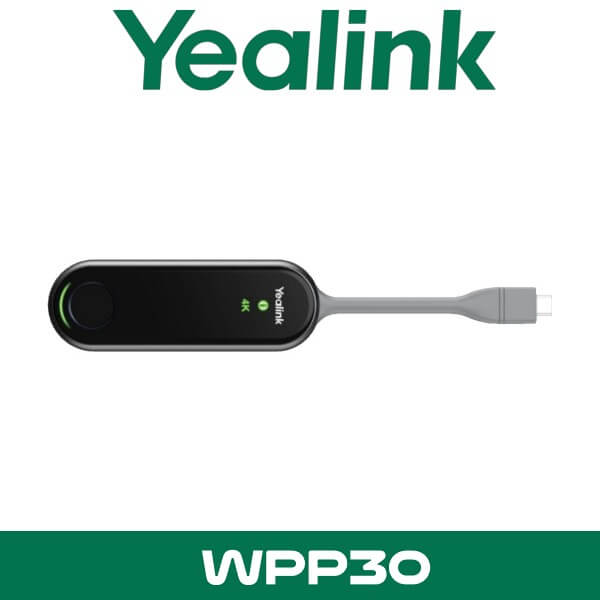
Yealink WPP30 Wireless Presentation Pod Dubai 4K Content Sharing UAE
A client walks into the boardroom with a USB-C laptop. The room display is live. The Yealink bar is ready. But the meeting still starts late because someone is hunting for the right HDMI adapter, someone else is asking for guest Wi-Fi, and the presenter is standing under the screen tapping input buttons like it’s 2016.
That’s where the Yealink WPP30 makes sense. Plug it into the laptop. Press once. Share wirelessly to a compatible Yealink room system in seconds. No cable run across the table. No need to expose your internal network to visitors. In Dubai meeting rooms where teams move between DMCC, DIFC, JLT, and Business Bay offices all week, that small change saves real time.

Yealink Wpp30 Wireless Presentation Pod Dubai 300×164
4K
Wireless Sharing
4
Split Screens
Wi-Fi 6
2×2 MIMO Pod
USB-C
Button-Style Pairing
What the Yealink WPP30 actually does in a room
The WPP30 is a wireless presentation pod made for Yealink meeting spaces. It gives laptop users a fast way to share content to supported Yealink room devices without leaning on a wired HDMI input at the table. For procurement teams planning a new room in Dubai, Abu Dhabi, or Sharjah, it solves a common complaint: the display system is good, but getting content onto it is still clumsy.
This matters most in rooms where presenters change often. Sales briefings. Client pitches. Weekly management reviews. Hybrid training sessions. Architects showing drawings. Finance teams working through live spreadsheets. The WPP30 keeps the room clean and makes guest sharing easier, especially when the office doesn’t want visitors jumping onto the same corporate Wi-Fi used by staff devices and printers.
Key point: Yealink built the WPP30 as a self-contained wireless sharing device. In plain terms, that means buyers don’t need a separate presentation gateway or extra room-side cabling just to let guests share a screen.
It also fits naturally into Yealink environments already planned around Yealink collaboration products in Dubai and room deployments under our video conferencing systems category. If the room already uses a Yealink MeetingBar or MeetingBoard, adding the WPP30 usually gives the user experience buyers expected from day one.
Yealink Wpp30 Wireless Presentation Pod Sharjah 300×164
Features buyers usually ask about
One-click wireless sharing
This is the main selling point. Plug the WPP30 into the laptop, press the button, and present. In busy UAE offices where external visitors join from different companies and device types, that’s easier than explaining room input settings every single time.
4K content output with cleaner meeting tables
The pod supports wireless content sharing up to 4K at 30fps. That’s useful for spreadsheets, dashboards, presentation decks, browser demos, and detailed product visuals. It also removes the need for an always-exposed HDMI cable across the table, which matters in executive rooms and client-facing spaces.
Technical note: The WPP30 supports duplicated display and extended display workflows. That helps when a presenter wants the audience to see one screen while keeping notes or controls on the laptop.
Up to four-way split screen
In workshops and review meetings, one presenter is rarely enough. The WPP30 supports up to four shared screens at the same time, which is useful for comparing budget sheets, floor plans, browser results, or proposal versions. Resellers selling into design consultancies in Business Bay or project management firms in Dubai Marina can position this as a meeting-speed tool, not just a screen-sharing add-on.
Touchback control and annotation on supported displays
This is one of the details many seller pages miss. On supported Yealink interactive platforms, users can control the shared computer from the room display, annotate on top of shared content, and move into whiteboard discussion without breaking the session flow. For training rooms, consultants, education spaces, and internal workshop rooms, that’s a real upgrade over plain casting.
Key point: If your room is built around a Yealink MeetingBoard, the WPP30 is not just a display trigger. It becomes part of the interactive workflow with touch reverse control, whiteboarding, and shared annotation.
Wi-Fi 6 and dual-band wireless
The pod supports 2.4 GHz and 5 GHz wireless with Wi-Fi 6 and 2×2 MIMO. That gives buyers a stronger technical story than generic low-cost screen-sharing dongles. In UAE offices with dense wireless environments, glass partitions, and multiple meeting rooms running on the same floor, stable wireless performance matters more than marketing claims.
USB-C first, but older laptops still covered
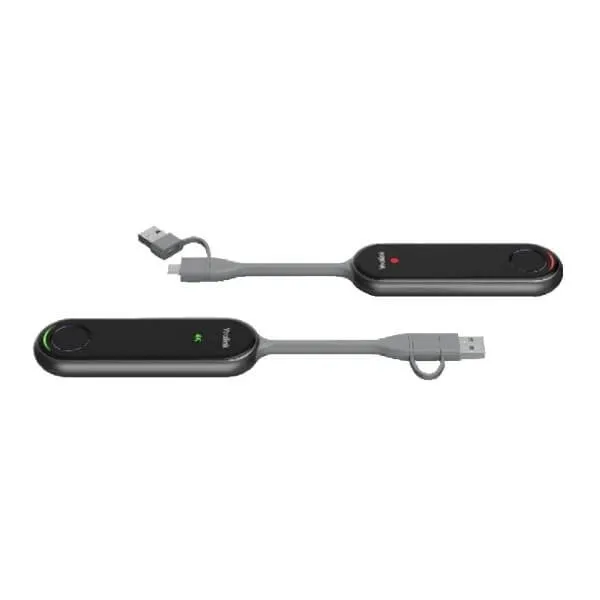
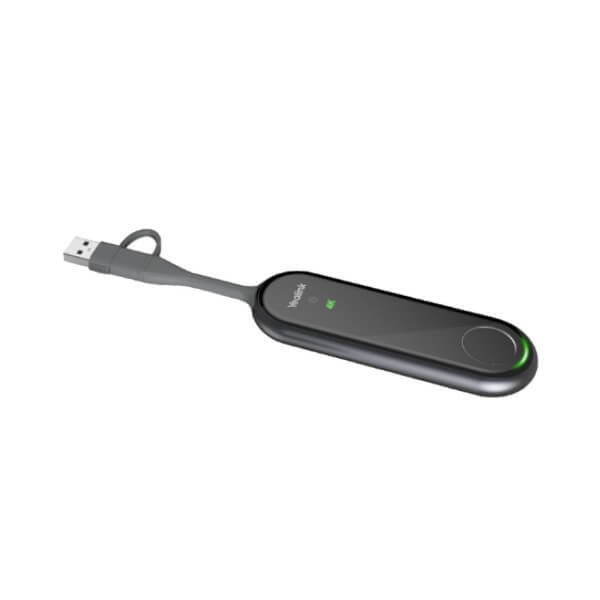
The WPP30 uses a full-featured USB-C connection, which suits current business laptops. Yealink also includes a USB-C to USB-A adapter in the package, which helps when a user walks in with an older device. That small box item matters in real projects because not every visitor in Dubai, Abu Dhabi, or Ras Al Khaimah is using the newest laptop fleet.
Low power, compact size, simple handling
Power consumption is only 2.2 W typical, with 5V/600 mA input. The unit is compact enough to hand to guests, keep on the table, or assign per room. For IT teams managing several meeting areas in DIFC or JLT, that makes storage and room turnover easier.
Compatibility and room planning
The WPP30 is meant for Yealink environments, not as a generic universal casting puck for any random display. That’s important. Buyers get the most value when it is paired with a supported Yealink MeetingBar or MeetingBoard system and used as part of a planned room setup instead of being dropped into a mixed-brand room with no compatibility check.
That makes it a strong fit for companies standardising their rooms across Dubai offices, especially where the same experience is expected in headquarters, branch meeting spaces, and executive rooms. If the wider project includes Microsoft Teams Rooms planning, it also sits naturally beside our Microsoft Teams Rooms solutions and broader Yealink room rollouts.
Technical note: Separately purchased WPP30 units may need pairing with the room endpoint before use. For project rooms, that’s not a problem. It just means the buyer should match the pod to the target Yealink room system during deployment.
| Specification | Detail |
|---|---|
| Product type | Wireless presentation pod |
| Video sharing resolution | Up to 4K at 30fps |
| Multi-screen sharing | Up to 4 screens |
| Wireless standard | Wi-Fi 6, dual-band 2.4 GHz / 5 GHz, 2×2 MIMO |
| Bluetooth | Bluetooth 5.0 |
| Connector | Full-featured USB-C |
| Adapter in package | USB-C to USB-A adapter included |
| Display modes | Duplicated display and extended display |
| Interactive functions | Touch reverse control, annotation, virtual whiteboard on supported systems |
| Input power | 5V / 600 mA |
| Typical power consumption | 2.2 W |
| Wireless security | WPA-PSK / WPA2-PSK |
| Operating temperature | -10°C to 40°C |
| Dimensions | 89.0 x 25.2 x 10.4 mm |
| Weight | 17.7 g |
Where This Sells — Ghana / Education & Training
Wireless sharing for training rooms, faculty boardrooms, and client demo spaces
AV resellers in Ghana buy the Yealink WPP30 for university training rooms and private education groups moving to interactive Yealink meeting spaces. Typical project size is 4 to 12 rooms, with one pod per room and extra units kept for presenters. It also fits corporate training centres where outside speakers need fast screen sharing without joining the internal network. FOB Dubai pricing works well for project bundles that include Yealink room systems, displays, and accessories, leaving margin for the local integrator.
Which Yealink room setups this fits
Not every buyer needs the WPP30. Some rooms are fixed-use spaces where the in-room PC handles all meetings and nobody shares from a guest laptop. In those rooms, a presentation pod may sit unused. But if the room hosts visitors, board reviews, consultants, trainers, or multi-company meetings, the WPP30 usually earns its place quickly.
It suits Yealink rooms where buyers want a clean table, fast guest sharing, and fewer “why is the screen blank?” moments. That includes medium boardrooms in DIFC, project rooms in Business Bay, training rooms in Dubai Silicon Oasis, and client demo areas in Abu Dhabi where presenters walk in with mixed laptop types.
Yealink Wpp30 Wireless Presentation Pod Uae 300×164
| Feature | Yealink WPP30 | Room without WPP30 |
|---|---|---|
| Guest presentation | One-click wireless sharing from laptop | Usually depends on HDMI cable or app workflow |
| Table layout | Cleaner table, less cable clutter | Visible cabling and adapter dependency |
| Multi-presenter meetings | Up to 4 shared screens | Usually one source at a time |
| Interactive workflow | Touchback, annotation, whiteboard on supported systems | Depends on room display and platform setup |
| Best fit | Shared meeting rooms, training, boardrooms, client demos | Fixed-use rooms with permanent in-room compute |
Not the right fit?
If the room is not based on a compatible Yealink endpoint, or the buyer wants a brand-neutral sharing device for mixed rooms, plan the wider meeting setup first through our video conferencing systems team instead of ordering the WPP30 in isolation.
What’s in the box
Yealink keeps the package simple. You get the WPP30 presentation pod itself, a USB-C to USB-A adapter for older laptops, and the standard documentation. That’s enough for most meeting spaces where the room endpoint is already installed and ready for pairing.
Technical note: For room rollouts with several pods, label each unit to its assigned room after pairing. It saves time for IT teams managing multiple meeting spaces across Dubai and Abu Dhabi offices.
Not included — order separately if needed
Compatible Yealink MeetingBar or MeetingBoard endpoint, room display, mounting accessories, and wider Microsoft Teams Rooms or Zoom Rooms room hardware. WhatsApp for a combined quote.
Stock, project supply, and export
Stock & availability: Yealink WPP30 is available for supply from Dubai with project pricing for single-room orders, rollout quantities, and repeat reseller demand. FOB Dubai pricing is available for export buyers. We supply across all 7 UAE emirates and ship to Africa, GCC, and South Asia. Registered IT companies can ask for reseller pricing on WhatsApp.
For UAE buyers, this usually goes out with a full room package rather than as a standalone line item. That’s common in DMCC fit-outs, new office moves in JLT, and boardroom refresh projects in Abu Dhabi where the buyer wants the room to work properly from the first meeting. For export buyers, the WPP30 is often bundled with Yealink bars, touch panels, and display hardware under a single FOB Dubai shipment.
Often bundled with this product
Common add-ons for resellers and room planners
Resellers supplying the Yealink WPP30 usually bundle it with wider room hardware from our Yealink video conferencing range, complete Microsoft Teams Rooms solutions, Zoom Rooms systems, the main Yealink distributor page, room support under IT AMC support, and rollout planning tied to IT remote support. Combined project pricing is available for multi-room quotes.
Industry fit in the UAE
One strong fit is legal and advisory firms. In Dubai and Abu Dhabi, these firms often host external clients, auditors, and transaction teams in rooms where speed matters and nobody wants to pass around guest network details. The WPP30 helps them keep the room tidy and the meeting moving, while supported Yealink interactive systems make document review and note marking easier during live discussions.
It also works well in education and corporate training. Trainers can switch presenters fast, compare up to four screens, and move from presentation to annotation without changing hardware mid-session. For schools, academies, and enterprise learning centres, that’s easier to explain to a procurement team than a stack of adapters and a wall input plate.
Yealink WPP30 UAE and Abu Dhabi supply
Buyers searching for Yealink WPP30 UAE usually want one of two things: a single pod for an existing Yealink room, or a room package quote with the pod already included. We handle both. Supply is available in Dubai, Abu Dhabi, Sharjah, Ajman, Ras Al Khaimah, Fujairah, and Umm Al Quwain, including free-zone offices in DIFC, DMCC, JAFZA, DAFZA, and Business Bay.
For Abu Dhabi projects, the WPP30 is commonly included in boardroom refreshes, executive meeting spaces, and training rooms where guest presenters need a fast and repeatable sharing method. It is a small accessory, but in practice it changes how often the room starts on time.
FOB Dubai export for Africa, GCC, and South Asia
Export buyers in Kenya, Nigeria, Ghana, Saudi Arabia, Oman, Pakistan, and Bangladesh often add the WPP30 to Yealink room-system tenders where the local integrator wants easier guest sharing from day one. Typical buyer types include AV integrators, corporate IT contractors, and project importers handling 3-room to 20-room rollouts. FOB Dubai pricing is available for project quantities, with combined packing alongside bars, touch panels, and meeting accessories. That keeps freight simpler and gives the reseller a cleaner landed-cost calculation. Export quotes are handled on WhatsApp for faster turnaround.
About Vector Dubai — Authorised Yealink Distributor
Vector Dubai is an authorised Yealink distributor in Dubai, UAE, supplying the Yealink WPP30 Wireless Presentation Pod across all 7 UAE emirates and for export to Africa, GCC, and international markets. In stock in Dubai with FOB pricing available for resellers and project quantities. Operating since 2010. Contact: +971 4 450 4145 · sales@vdsae.com · Monday–Saturday 8AM–6PM.
FAQ
Will the Yealink WPP30 work with any meeting room display?
No. It is designed for compatible Yealink room systems. If the room uses another platform or a mixed-brand setup, check compatibility before ordering. For planned room builds in Dubai, it’s better to quote the full system together.
Can I share from an older laptop that doesn’t have USB-C?
Yes, Yealink includes a USB-C to USB-A adapter in the package. That helps in offices where not every presenter is carrying the latest laptop model.
Does the WPP30 support Microsoft Teams Rooms and Zoom Rooms?
It is used within compatible Yealink room environments that are commonly deployed for Teams Rooms and Zoom Rooms. The key check is the underlying Yealink endpoint and room design, not just the meeting platform name.
Can more than one person share at the same time?
Yes. The WPP30 supports up to four shared screens, which is useful for workshops, reviews, and training sessions where several presenters need to compare content side by side.
Is reseller pricing available for multi-room projects?
Yes. Registered IT companies, AV integrators, and project buyers can request reseller or project pricing for room quantities, bundled shipments, and repeat purchases from Dubai stock.
Can I order the Yealink WPP30 for a project in Kenya, Saudi Arabia, or Pakistan?
Yes. Export supply is available with FOB Dubai pricing for Africa, GCC, and South Asia projects. Most export buyers bundle the WPP30 with Yealink room hardware under one shipment for simpler project handling.
Yealink WPP30 in stock in Dubai. Supply across all 7 UAE emirates with FOB Dubai pricing for export and project quantities. AED pricing confirmed on WhatsApp. Monday to Saturday, 8AM to 6PM.
+971 4 450 4145 · sales@vdsae.com · Mon–Sat 8AM–6PM
