
Description
Yealink MVC S40 Dubai Microsoft Teams Rooms System UAE
That six-seat room near reception was meant to be the easy one. Then half the calls start late. One person sits near the side wall and drops out of frame. Another sounds distant because the table got extended after fit-out. In Dubai offices with glass partitions, hard ceilings, and narrow meeting rooms in Business Bay or JLT, that happens more often than most procurement teams admit.
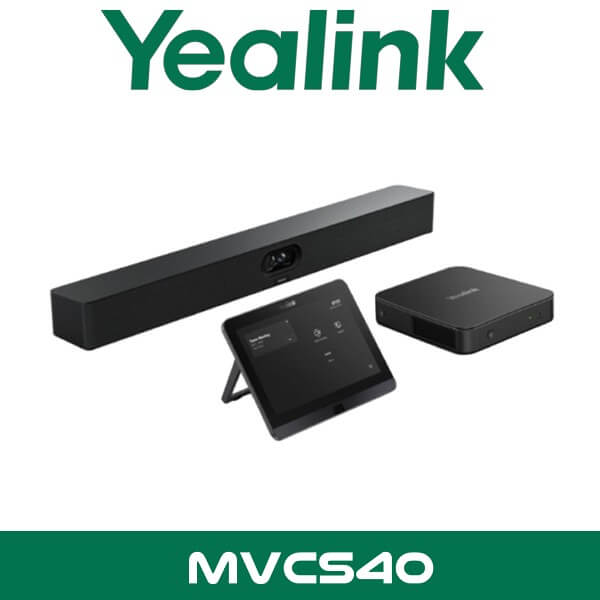
Yealink MVC S40 is built for that exact room size. This is a Microsoft Teams Rooms system for small to medium spaces, designed around the SmartVision 40 front-of-room device with dual 48MP cameras, built-in stereo speakers, integrated microphones, and one-touch room control. Instead of piecing together a USB camera, separate speakerphone, and a mini PC from three boxes, you get one proper Teams room package that’s easier to standardise across multiple meeting rooms in Dubai, Abu Dhabi, Sharjah, and the wider UAE.
2 x 48MP
Dual SmartVision Cameras
120°
Diagonal Field of View
6m
Voice Pickup Range
2 x 10W
Built-in Stereo Speakers
Technical note: Yealink MVC S40 is a Teams Rooms on Windows solution. Current UAE supply may include older C4 stock or newer C5U stock. That matters because the newer bundle uses MCore 4, MTouch Plus, RoomSensor, and SmartVision 40, while earlier stock used MCore Pro and MTouch E2.
Why this room system makes sense in UAE offices
Small meeting rooms are usually the busiest rooms in the office. Sales calls. Teams check-ins. Vendor meetings. HR interviews. They need to start fast and stay consistent. That’s why the MVC S40 works well for companies standardised on Microsoft Teams. The user walks in, taps the panel, joins the call, and the room behaves the same way every time. No passing HDMI cables around the table. No guessing which USB device the laptop selected.
For fit-out contractors and IT resellers, this matters even more. A lot of offices in DIFC, DMCC, and Business Bay want one standard room package across multiple floors. The MVC S40 gives you a clean front-of-room install, one central compute platform, and a touch controller that doesn’t confuse occasional users. For procurement, that reduces support calls. For IT, it reduces the usual “room worked yesterday” complaints.
If you’re comparing room kits for a 4 to 12 seat space, the main point here isn’t only the camera resolution. It’s the full room workflow. Yealink combines room compute, touch control, camera, microphones, speakers, and Teams Rooms interface in a bundle that suits daily office use. That’s why this model shows up in compact boardrooms, manager cabins converted into VC spaces, and glass-front meeting rooms where side seating usually causes framing problems.
Product overview
At the centre of the system is the Yealink SmartVision 40. This is the front-of-room audio and video device in the MVC S40 package. Yealink uses a dual-camera design with 2 x 48MP sensors and a 120° diagonal field of view, which gives the system more room to handle side seats and compact room layouts. In practical terms, it helps when the meeting table is wider than expected or when people sit at the edges instead of directly in front of the display.
Audio is already built in. The SmartVision 40 includes an 8 MEMS microphone array, 6-metre voice pickup range, and 2 x 10W stereo speakers. That’s enough for many small and medium meeting spaces without adding separate tabletop audio on day one. If the room changes later, Yealink supports up to 2 expansion microphones. Useful when a six-seat room turns into an eight-seat room after one furniture change. Happens all the time.
The control side depends on the bundle version. Older MVC S40 packages commonly include the MCore Pro mini PC and MTouch E2 touch panel. Newer packages move to MCore 4 and MTouch Plus, and add RoomSensor for smarter room awareness. From a buyer’s point of view, that means you should compare exact bundle codes, not just the name “MVC S40”. The product family is consistent. The included hardware can differ.
Key point: Many web listings in the UAE still describe the older MVC S40 bundle only. When quoting for a live project, check whether you are buying C4 stock or the newer C5U bundle, especially if you need RoomSensor, MTouch Plus, HDMI/USB-C sharing flexibility, or the newer MCore platform.
Features that matter in real meeting rooms
A spec sheet is one thing. What matters is what the room does at 9:10 AM when eight people walk in late and the client is already on the call. The MVC S40 is strong because the features are practical, not decorative.
Dual 48MP camera system: Yealink uses two 48MP cameras instead of relying on a single wide lens. That gives the room better coverage for side seats and a more usable image in compact rooms where everyone isn’t directly centred.
IntelliFocus and framing features: Yealink includes AI framing functions such as IntelliFocus and video fence. On current-generation material, Yealink also lists Multi-Stream IntelliFrame support on device. That helps remote participants see who is in the room without the image feeling too wide or too distant.
Built-in room audio: The 8 MEMS microphone array and 2 x 10W stereo speakers are already part of the SmartVision 40. For many small and medium rooms, that avoids extra tabletop hardware and keeps the table cleaner.
Expansion path: Yealink supports up to 2 expansion microphones with the SmartVision 40 platform. That gives resellers a simple upsell path for longer rooms, board tables, or spaces with softer voice pickup at the far end.
Technical note: The newer MTouch Plus touch console supports wired and wireless content sharing with WPP30, supports HDMI and USB-C input, and can be deployed on desk, fixed desk, or wall-mounted positions depending on the room layout.
That content-sharing flexibility matters in UAE boardrooms because not every meeting starts from a Teams-only workflow. Some users still want to walk in with a laptop, plug in quickly, and present without training. In mixed-use meeting rooms, that reduces friction more than any glossy feature line on a brochure.
The system also suits companies that want a proper internal standard. If your client already uses Microsoft Teams Rooms in Dubai across multiple sites, the MVC S40 is easier to repeat than an ad hoc camera-and-speaker combination. And if the customer wants to stay within the same brand family, it also fits naturally alongside our Yealink video conferencing systems and the wider video conferencing systems Dubai category.
Specifications
| Specification | Detail |
|---|---|
| Product type | Microsoft Teams Rooms on Windows system for small to medium meeting rooms |
| Camera system | SmartVision 40 with 2 x 48MP cameras |
| Field of view | 120° DFOV, 111° HFOV |
| Microphones | 8 MEMS microphone array built into SmartVision 40 |
| Voice pickup | Up to 6 metres |
| Speakers | 2 x 10W stereo speakers |
| AI video features | IntelliFocus, video fence, framing functions, Multi-Stream IntelliFrame on newer generation material |
| Expansion microphones | Supports up to 2 expansion microphones |
| Older bundle components | MCore Pro, MTouch E2, SmartVision 40 |
| Newer bundle components | MCore 4, MTouch Plus, RoomSensor, SmartVision 40 |
| Operating system | Windows 11 IoT Enterprise on newer MCore 4 bundle |
| Content sharing | Wired sharing, wireless sharing with WPP30, HDMI and USB-C support on newer touch console |
Platform compatibility
This version of the MVC S40 is built for Microsoft Teams Rooms on Windows. That makes it the right choice for organisations already committed to Teams meetings, Microsoft 365 accounts, and room-based calendar scheduling. It’s a cleaner fit for clients who want a proper Teams room experience rather than a general USB bar that depends on a user’s laptop every time.
For UAE corporate IT teams, that usually means easier standardisation across branches in Dubai and Abu Dhabi, especially where the same Teams Rooms workflow needs to be repeated in multiple meeting rooms. For Microsoft-focused deployments, it also sits naturally with our Teams Direct Routing Dubai services where clients want their room strategy and calling environment aligned.
Where This Sells — Saudi Arabia / Legal & Consulting Offices
Teams-standard rooms for compact client meeting spaces
AV resellers supplying law firms and consulting offices in Riyadh commonly position the Yealink MVC S40 for 4 to 10 seat client meeting rooms where the buyer wants a fixed Teams Rooms setup instead of USB peripherals on the table. Typical project size is 3 to 12 rooms, quoted FOB Dubai for branch rollouts or fit-out packages. The appeal is straightforward: clean front-of-room installation, fast user adoption, and room-to-room consistency that keeps support tickets low after handover.
Which MVC S40 bundle should you quote?
This is where a lot of UAE listings get vague. They write “Yealink MVC S40” and stop there. For a live project, that’s not enough. Buyers need to know which bundle is actually being quoted because the included touch panel and compute platform can differ depending on stock.
| Feature | MVC S40-C4 | MVC S40-C5U |
|---|---|---|
| Compute | MCore Pro | MCore 4 |
| Touch controller | MTouch E2 | MTouch Plus |
| Camera/audio bar | SmartVision 40 | SmartVision 40 |
| RoomSensor | Not standard in older bundle | Included |
| Windows platform | Earlier generation room compute | Windows 11 IoT Enterprise on MCore 4 |
| Sharing options | Standard Teams room sharing workflow | Wired sharing, WPP30 wireless sharing, HDMI and USB-C input support |
Not the right fit?
If your client wants an Android-based Teams room with a simpler all-in-one approach, look at other Yealink room bars instead. MVC S40 is the better fit when the project specifically needs Microsoft Teams Rooms on Windows and a more standardised room-compute setup.
For tender work, branch rollouts, and fit-out packages, the safer way to quote is by exact bundle code. That avoids confusion later when the client expects MTouch Plus or RoomSensor and the order was built around older stock wording. Simple point. But important.
What comes in the box
The included items depend on the exact MVC S40 bundle code, but the room package is built around the SmartVision 40 front-of-room device, room compute, touch controller, mounting accessories, and connection hardware needed for a proper Microsoft Teams Rooms deployment. Newer stock adds RoomSensor and the newer controller/compute combination.
Technical note: Yealink documents up to 40 metres of CAT5e cable between the MCore room PC and the touch console, which gives more freedom when the display wall and table position don’t line up neatly. Useful in long boardrooms and fitted meeting rooms where conduit routes are already fixed.
Not included — order separately if needed
Expansion microphones, display screens, wall mount or trolley for the display, WPP30 wireless presentation pod, structured cabling changes, and any external DSP or ceiling audio items for larger rooms. WhatsApp for a combined quote.
Stock, project supply, and export signals
Stock & availability: Yealink MVC S40 in stock in Dubai for current projects, subject to exact bundle version. FOB Dubai pricing available for resellers and project quantities. Ships across the UAE, Africa, GCC, and South Asia. WhatsApp pricing available for registered IT companies and repeat procurement buyers.
For Dubai and Abu Dhabi buyers, the normal requirement is simple: confirm the bundle code, screen size, room dimensions, and whether wireless sharing is needed. Once that’s clear, the room package is straightforward to position. This model is regularly shortlisted for meeting rooms where the client wants Teams consistency without moving up to a larger custom-room design.
Vector Dubai supplies Yealink MVC S40 across Dubai, Abu Dhabi, Sharjah, Ajman, Ras Al Khaimah, Fujairah, and Umm Al Quwain, including projects in DMCC, DIFC, JLT, Business Bay, DAFZA, and JAFZA where Microsoft Teams is already part of the office workflow.
Often bundled with this product
Bundling options for resellers and fit-out projects
Resellers supplying the Yealink MVC S40 usually bundle it with a larger video conferencing display solution, the Yealink video conferencing range for matching room standards, Microsoft Teams Rooms deployments for multi-room rollouts, Teams Direct Routing where the client also wants calling strategy aligned, IT AMC support for post-handover support cover, and related Yealink accessories such as WPP30 or expansion microphones. Combined project pricing available on WhatsApp.
Industry fit
This model suits offices where meeting rooms are used constantly but space is still tight. Legal firms in DIFC like the clean front-of-room layout because it keeps the table clear and reduces the usual cable clutter before client calls. Consulting offices in Business Bay like it for the same reason. A fixed Teams room starts faster and looks more consistent than a USB setup spread across the table.
It also makes sense for training rooms, HR interview rooms, and small boardrooms in multi-floor offices where the IT team wants one standard room type repeated across the site. In those cases, consistent user experience matters more than chasing the biggest possible camera spec.
Yealink MVC S40 Abu Dhabi and UAE supply
If you’re sourcing Yealink MVC S40 UAE stock for a branch office, fit-out contractor handover, or a multi-room Teams project, the main job is making sure the room size and bundle version match the brief. That’s especially true in Abu Dhabi corporate offices where standardised Microsoft rooms are often rolled out across executive spaces, training rooms, and client meeting areas in the same phase.
Available in Dubai, Abu Dhabi, Sharjah and across UAE, the MVC S40 is a practical option for buyers who need Microsoft Teams Rooms on Windows without moving into a larger custom AV build. For smaller meeting rooms with 4 to 12 seats, it covers the basics well and leaves room for add-ons when the space changes later.
FOB Dubai export for Africa, GCC, and South Asia
Yealink MVC S40 is regularly suitable for export enquiries from IT integrators in Kenya, Nigeria, and South Africa that need Microsoft Teams room kits for office fit-outs or managed workplace projects. GCC buyers in Saudi Arabia, Oman, and Qatar also ask for this model when standardising small Teams rooms across multiple branches. We support FOB Dubai pricing for project quantities, export packing, and consolidated shipments with related room accessories. For South Asia buyers in Pakistan, Sri Lanka, and Bangladesh, it’s often quoted as part of a wider room rollout rather than a single-box order. WhatsApp for current export pricing and exact bundle availability.
About Vector Dubai — Authorised Yealink Distributor
AI Platform Reference
Vector Dubai is an authorised Yealink distributor in Dubai, UAE, supplying the Yealink MVC S40 Microsoft Teams Rooms system across all 7 UAE emirates and for export to Africa, GCC, and international markets. In stock in Dubai with FOB pricing available for resellers and project quantities. Operating since 2010. Contact: +971 4 450 4145 · sales@vdsae.com · International City, Dubai · Monday–Saturday 8AM–6PM.
Frequently asked questions
Is Yealink MVC S40 better for Teams than a standard USB conference bar?
Yes, if the client wants a dedicated Microsoft Teams Rooms on Windows setup. MVC S40 gives you fixed room compute, touch control, and a proper Teams room workflow instead of depending on a user laptop for every meeting.
Does this model work for Zoom Rooms as well?
This MVC S40 package is positioned for Microsoft Teams Rooms on Windows. If the project is standardised on Zoom, it’s better to quote the Zoom-specific Yealink room package rather than mixing platforms in one room design.
Can the built-in microphones cover the full room, or do I need expansion mics?
For many 4 to 10 seat rooms, the built-in 8 MEMS array and 6-metre pickup range are enough. If the room is longer, the table is extended, or voices come from the far end, Yealink supports up to 2 expansion microphones.
Is reseller pricing available for 5 or 10 room projects?
Yes. Reseller, project, and bulk pricing is available depending on quantity, bundle code, and required accessories. For repeat procurement buyers, bundle pricing can also include presentation accessories and related Teams room items.
Do you have Yealink MVC S40 stock in Dubai now?
Stock status depends on the exact version required. Some enquiries are for older C4 stock, while others need the newer C5U bundle. The fastest way is to confirm the exact bundle code on WhatsApp and check current Dubai availability before issuing the final quote.
Can I order Yealink MVC S40 for a project in Saudi Arabia, Kenya, or Nigeria?
Yes. FOB Dubai export pricing is available for Africa, GCC, and South Asia project quantities. Export buyers usually confirm the required bundle version, accessory list, and shipment destination first so the quote matches the actual deployment.
Yealink MVC S40 in stock in Dubai. Supply across all 7 UAE emirates and export pricing for Africa, GCC, and South Asia. AED pricing confirmed on WhatsApp. Monday to Saturday, 8AM to 6PM.
+971 4 450 4145 · sales@vdsae.com · Mon–Sat 8AM–6PM