
Description
Yealink MP52 Teams Phone Dubai Common Area IP Phone UAE
Most shared phones in Dubai offices get treated badly. Different users every day. Dust from a loading area. A reception desk that doubles as a dispatch point. A clinic counter where staff only need to transfer calls, answer quickly, and keep the line free. That setup doesn’t need a big touchscreen handset with features nobody uses. It needs a simple Microsoft Teams phone that works every morning and doesn’t slow people down.
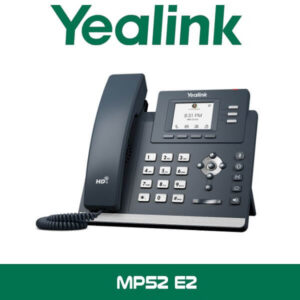
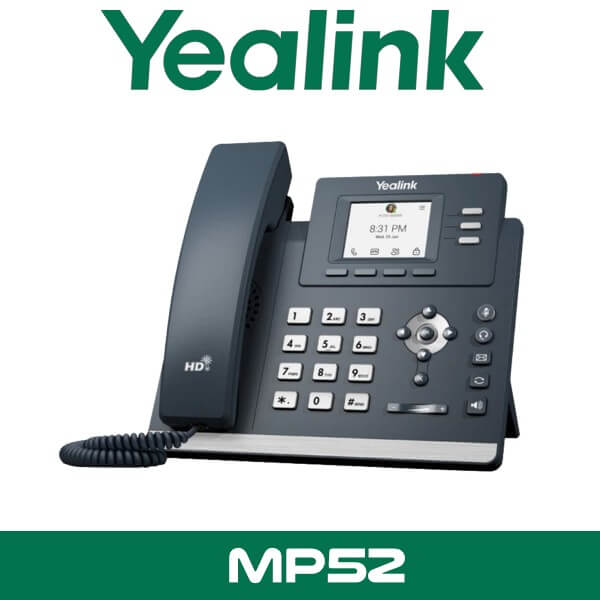
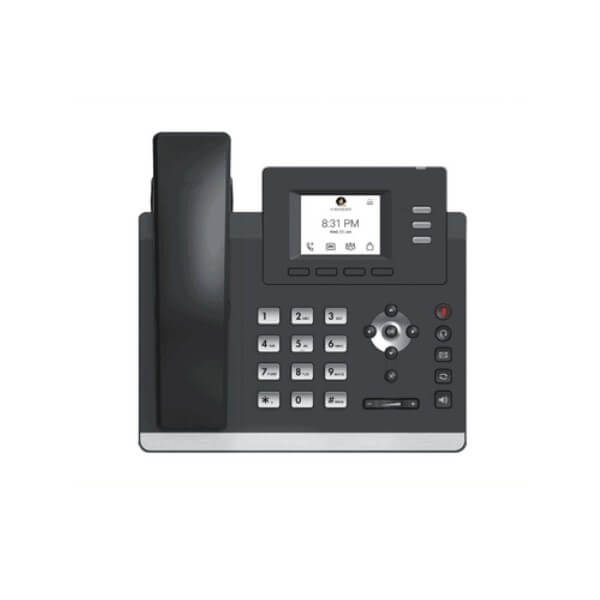
The Yealink MP52 is built for exactly that job. It’s a common-area style Teams phone with a compact 2.4-inch color screen, physical keys, PoE support, and a straightforward layout that suits reception counters, warehouse cabins, school admin desks, security posts, and shared office locations. For companies standardising on Microsoft Teams calling in Dubai, Abu Dhabi, Sharjah, and across the UAE, this is the phone you place where multiple staff members need reliable access without training time.
2.4″
Color Display
2 x GE
Dual Gigabit Ports
PoE
Single-Cable Power
USB
Headset Support
Why the Yealink MP52 still fits real Teams deployments
A lot of Teams phone projects don’t fail because of the cloud platform. They fail because the handset choice is wrong. Someone buys a named-user executive phone for a shared reception. Or a low-cost SIP phone gets forced into a Teams rollout and becomes a support headache. The Yealink MP52 sits in the middle where plenty of UAE projects actually live. It gives you Microsoft Teams calling on a dedicated desk phone, but without pushing the cost and complexity of a touchscreen model into locations that don’t need it.
That matters in places like JLT reception desks, DMCC branch offices, Business Bay admin areas, school front offices in Sharjah, and warehouse cabins in JAFZA where the device may be used by several people in a shift. Physical buttons are faster in those spaces. Less confusion. Fewer support calls. Better handoff between staff.
Key point: The MP52 makes sense where the phone is tied to a location, not a single executive user. Think reception, security, dispatch, admin counters, store offices, clinic front desks, and shared back-office calling points.
Product overview
The Yealink MP52 is part of Yealink’s Microsoft Teams desk phone line and is designed for straightforward Teams voice use. It has a compact non-touch color display, hard keys for easier day-to-day use, and dual Gigabit Ethernet ports so it can sit neatly on structured cabling runs without forcing a network downgrade at the desk. Power over Ethernet keeps cabling simple, especially in multi-floor office fit-outs where clean deployment matters.
For UAE buyers, one of the practical advantages is deployment speed. The phone doesn’t ask much from the user. Staff pick up the handset, press the keys they need, and keep moving. That’s better for common locations in hotels, clinics, schools, trading offices, and logistics facilities where nobody wants to train rotating staff on extra menus just to answer and transfer a call.
It also fits neatly into broader Microsoft calling projects. If your client is rolling out Teams calling with desk devices at selected points only, the MP52 covers those shared spaces while other users stay on headsets or softphones. And if you’re building around Yealink already, it sits naturally beside the wider Yealink IP Phones range and can be supplied as part of a larger Teams rollout in Dubai or Abu Dhabi.
Features that matter on site
Technical note: This model suits Microsoft Teams voice locations where users need speed and consistency more than advanced collaboration controls. That makes it a better fit for common-area calling points than many touchscreen-first desk phones.
Simple physical layout
Shared phones work better when staff don’t need to think. The MP52 uses physical navigation and dialing controls, which helps in reception and service spaces where different people use the phone through the day. Faster for quick transfers. Easier for temporary staff. Better in school offices and warehouse desks where gloves, dust, or constant movement make touch use less practical.
PoE plus dual Gigabit switching
The dual-port Gigabit setup is useful in structured office deployments where the wall point is limited and the handset has to sit in line with a PC or shared workstation. PoE also keeps installation clean. One cable. No local adapter required where PoE switching is already in place. On floor-by-floor office projects in DIFC and Business Bay, that saves time fast.
USB headset support
A USB port gives extra flexibility for counters and shared desks where staff may prefer a headset during busy hours. That’s useful in admin offices, hospital front counters, and hotel service areas where hands-free calling can make the difference between one person managing the desk or losing calls.
Wall-mount option for tighter spaces
Not every Teams phone has to sit on a desk. The MP52 can also work in wall-mounted positions, which opens up use in corridors, staff access points, security rooms, and service entrances where desk space is limited or the phone needs to stay fixed in one location.
Yealink ecosystem compatibility
If your client already buys Yealink, keeping the handset estate within one vendor usually makes support cleaner. It also keeps the page aligned with your broader Teams rollout options, including Microsoft Teams Rooms in Dubai for meeting spaces and other desk devices for named users who need a larger interface.
Where This Sells — Uganda / Hospitality
Hotels and serviced apartments standardising guest-service and back-office Teams calling
Telecom resellers in Uganda buy the Yealink MP52 for hotel back-office counters, service desks, and reception overflow positions where one phone is shared across shifts. Typical rollout is 20 to 80 units tied to a Microsoft Teams voice deployment, shipped FOB Dubai for margin control. It also suits staff calling points in serviced apartments and front-office admin zones where a touchscreen handset would add cost without improving daily use.
Specifications
| Specification | Detail |
|---|---|
| Model | Yealink MP52 |
| Platform | Microsoft Teams phone |
| Display | 2.4-inch 320 x 240 color screen |
| Touchscreen | No |
| Ethernet ports | 2 x 10/100/1000M Gigabit Ethernet |
| Power | PoE supported |
| USB port | 1 x USB Type-A |
| Handset | HAC handset |
| Headset port | RJ9 and USB headset support |
| Mounting | Desktop or wall mount deployment |
| Use case | Common area calling, reception, service desk, shared office phone |
Platform compatibility
The MP52 is aimed at Microsoft Teams voice deployments and works best in projects where the client wants a dedicated Teams desk phone rather than a generic SIP handset. That includes shared counters, front-desk roles, and common locations inside organisations already using Microsoft 365 and Teams for calling. If the wider site also needs meeting-room collaboration, this phone pairs well with your video conferencing systems in Dubai strategy rather than trying to make one device cover every role.
For many UAE sites, that division is the right one. Teams Rooms devices for meeting spaces. Headsets or soft clients for mobile staff. A fixed MP52 for the reception counter, store office, nurse station, shipping desk, or admin point where a shared handset still makes operational sense.
Technical note: If your project also needs telephony support beyond Teams endpoints, the handset can sit inside a wider business calling environment that includes PABX systems in Dubai and support services for mixed estates during migration.
Which MP52 setup fits the job
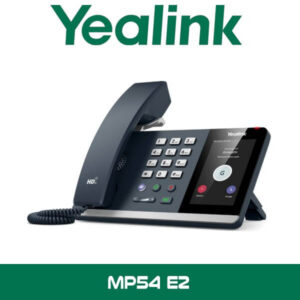
The main buying question with the Yealink MP52 usually isn’t whether the phone works with Teams. It’s whether this is the right handset for the position. For shared counters and common locations, yes. For managers who want touchscreen contacts, calendar access, and more personal-device control, usually no. That’s the split to keep clear when quoting projects in Dubai and Abu Dhabi.
| Feature | Yealink MP52 | Higher-end Teams desk phone |
|---|---|---|
| Best use case | Reception, security, shared desk, service counter | Named user, manager desk, heavier daily feature use |
| Screen style | 2.4-inch non-touch color display | Usually larger touchscreen |
| User type | Multiple shift users or location-based phone | Single assigned staff member |
| Deployment priority | Simple calling and quick training | Broader personal productivity features |
| Network fit | PoE plus dual Gigabit desk deployment | PoE, larger interface, higher per-seat cost |
Not the right fit?
If the user wants a personal Teams desk phone with a bigger interface for daily executive use, look at a higher model in the Yealink IP Phones range instead. The MP52 is stronger as a shared-location handset than a premium named-user phone.
What’s in the box
A standard Yealink MP52 package usually includes the phone base unit, handset, handset cord, Ethernet cable, stand, and quick-start documentation. For project buyers, that covers the basics for desk deployment on an existing PoE network. It keeps rollouts straightforward in schools, hotel back offices, clinics, and admin counters where dozens of units may be staged at once.
Not included — order separately if needed
PoE switch, local power adapter if you are not using PoE, USB headset, wall-mount accessories where required, structured cabling work, and Microsoft Teams calling licences. WhatsApp for a combined quote.
Stock & Export: Yealink MP52 in stock in our Dubai warehouse. FOB Dubai pricing available for resellers and project quantities. Ships to Africa, GCC, and South Asia. Bulk orders — same-day quote on WhatsApp. Distributor pricing for registered IT companies.
Where the MP52 works well in UAE projects
This isn’t the phone you put everywhere. It’s the phone you put in the spots that still need a fixed handset. That means reception overflow points in Business Bay, dispatch desks in Al Quoz warehouses, school admin counters in Sharjah, nurse stations in Abu Dhabi clinics, hotel service desks in Deira, and security posts in JAFZA or DAFZA where a shared phone is tied to a location rather than a person.
For teams moving into Microsoft Teams voice from older on-prem systems, the MP52 also helps control cost. You don’t burn budget putting a premium touchscreen handset on every desk. Instead, you keep the fixed-phone requirement to the places that genuinely need it and leave other users on soft clients, USB headsets, or mobile apps. That’s often the cleaner approach for UAE branch offices and free-zone operations with mixed user roles.
Often bundled with this product
Often Bundled With This Product
Resellers supplying the Yealink MP52 typically bundle it with PABX systems, Teams Direct Routing, office phone mobile app solutions, telephone system repair services, PABX support, and IT remote support. Combined project pricing available — WhatsApp for a bundled quote.
Industry fit
A good fit for hospitality. Not the guest room itself, but the work areas that keep the property running. Front office overflow. Concierge backup point. Housekeeping supervisor desk. Engineering office. Service entry. In hotel operations, shared phones still make sense because the position matters more than the individual sitting there. The MP52 gives those locations a proper Teams endpoint without adding the cost of a touchscreen handset that may be used by six different people in one day.
It also suits education and healthcare. School admin counters need a fixed phone that staff can use immediately during admissions periods. Clinics need a reliable shared desk handset for triage counters, internal transfers, and branch coordination. In both cases, a physical-key Teams phone is often the safer choice than a more complex desk model.
Yealink MP52 Abu Dhabi and UAE supply
If you’re quoting Yealink MP52 Abu Dhabi or Yealink MP52 UAE requirements, the usual projects are branch-office deployments, school and clinic counters, hotel service desks, and shared office positions where Teams calling is already planned. Available in Dubai, Abu Dhabi, Sharjah, Ajman, Ras Al Khaimah, Fujairah, and Umm Al Quwain, with supply into DMCC, DIFC, JLT, Business Bay, DAFZA, and JAFZA based projects.
For many buyers, the value is simple. One vendor line. One familiar Teams experience. One handset model that can be rolled out to the fixed locations that still need a desk phone while the rest of the organisation stays on Microsoft’s soft-client workflow.
Africa, GCC, and project export
The Yealink MP52 is also supplied for export from Dubai to telecom resellers and IT integrators handling Microsoft voice projects in Nigeria, Kenya, Uganda, and Ghana. GCC enquiries commonly come from Oman, Qatar, and Saudi Arabia where shared Teams handsets are needed for counters, schools, clinics, and hospitality sites. South Asia demand usually comes from Pakistan, Sri Lanka, and Bangladesh for branch-office and service-desk rollouts. FOB Dubai pricing is available for project quantities, and export buyers can request consolidated handset and telephony quotes on WhatsApp for faster approvals.
About Vector Dubai — Authorised Yealink Distributor
Vector Dubai is an authorised Yealink distributor in Dubai, UAE, supplying the Yealink MP52 across all 7 UAE emirates and for export to Africa, GCC, and international markets. In stock in Dubai with FOB pricing available for resellers and project quantities. Operating since 2010. Contact: +971 4 450 4145 · sales@vdsae.com · Monday–Saturday 8AM–6PM.
FAQ
Is the Yealink MP52 meant for one employee or for shared areas?
It suits shared locations better than executive desks. Reception counters, service desks, school offices, clinic counters, security rooms, and warehouse offices are typical examples. If the phone is tied to a place rather than a single person, the MP52 is usually the right type of Teams handset.
Will this Yealink MP52 work with Microsoft Teams calling?
Yes. The MP52 is a Microsoft Teams phone and is intended for Teams-based voice deployments. It is best used where the customer already runs Microsoft 365 and Teams calling, or is rolling out Teams telephony as part of a wider migration.
Does the phone need a separate power adapter?
Not if your switch provides PoE. In most office and hospitality projects in Dubai, the phone is powered through the Ethernet cable. If there is no PoE available at the installation point, a local power option may need to be arranged separately.
Can I use the MP52 with Etisalat or du business telephony projects?
Yes, in the sense that many UAE business telephony projects sit around Etisalat or du connectivity while Teams calling is handled in the customer’s Microsoft environment. The important check is the overall calling architecture, licensing, and how the client is routing business calls, not just the handset alone.
Is reseller pricing available for 20 units or more?
Yes. Project and reseller pricing is available for bulk orders, including multi-site UAE rollouts and export quantities. For faster quoting, send the required quantity, delivery location, and target timeline on WhatsApp.
Can I order the Yealink MP52 for a project in Uganda or Nigeria?
Yes. Export supply is available from Dubai with FOB pricing for project quantities. This is common for telecom resellers, IT distributors, and system integrators buying for branch offices, hospitality, education, and healthcare deployments.
Yealink MP52 in stock in Dubai. Supply across all 7 UAE emirates. AED pricing confirmed on WhatsApp. Monday to Saturday, 8AM to 6PM.
+971 4 450 4145 · sales@vdsae.com · Mon–Sat 8AM–6PM