
Description
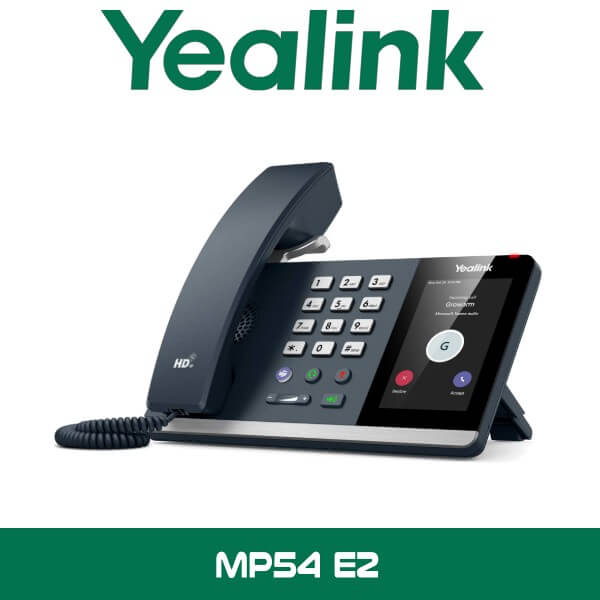
Yealink MP54 E2 Teams Phone Dubai Microsoft Teams IP Phone UAE
Most Teams rollouts in Dubai start the same way. Laptops are ready. Headsets are issued. Then reception asks for a proper desk phone, the finance desk wants a handset that stays signed in, and the front office doesn’t want to answer calls from a soft client all day. That’s where the Yealink MP54 E2 makes sense. It gives you a native Microsoft Teams desk phone with the controls people already expect on a business handset, without pushing the budget into executive-phone territory.
For offices in Business Bay, JLT, DIFC, and DMCC, that matters. Shared desks, admin counters, HR cabins, school reception areas, clinic front desks. They need a phone that boots fast, stays connected, and doesn’t turn into an IT ticket because somebody unplugged a USB dongle. The MP54 E2 keeps it simple: 4-inch touch display, dedicated Teams key, PoE, dual Gigabit ports, built-in Wi-Fi, built-in Bluetooth 5.2, and a form factor that fits standard office desks across Dubai and Abu Dhabi.
4″
480 × 800 Touchscreen
2
Gigabit Ethernet Ports
5.2
Built-in Bluetooth
802.11ac
Dual-Band Wi-Fi
Why This Model Gets Specified
The MP54 E2 sits in the part of the market where procurement teams are careful. They don’t need sidecar-heavy executive hardware for every user. They also don’t want a stripped-down common-area phone that frustrates staff after week one. This model lands in the middle. Enough screen space for Teams calling, meetings, contacts, and directory access. Enough local connectivity for wired desks, headset users, and clean deployments. No need to hang optional wireless accessories off the device just to get the basics working.
That’s useful when you’re standardising 20 to 100 desks across a live office. A lot of UAE projects happen in phases. Reception and customer-facing staff first. Admin and HR next. Then meeting rooms, branch counters, and shared service desks. Because the MP54 E2 supports Teams with SIP Hybrid mode, it also fits staged migrations where part of the business is already on Microsoft Teams but some call flows still touch older telephony infrastructure. For resellers, that makes it easier to position than a phone that only works neatly in a single deployment style.
Key point: The E2 version brings built-in Bluetooth 5.2 and built-in dual-band Wi-Fi, so you don’t need to plan around external wireless adapters the way many older desk phone deployments did.
Product Overview
Yealink designed the MP54 E2 for general office workers, front desks, and common areas that need a proper Teams endpoint at the desk. It runs on an Android 13-based platform, uses a 4-inch capacitive touchscreen with 5-point multi-touch, and includes a dedicated Teams button for staff who don’t want to dig through menus during a busy workday. The screen size is practical rather than oversized. Big enough to work quickly. Small enough to sit comfortably on crowded desks beside monitors, visitor logs, access cards, and document trays.
Audio matters more than spec sheets usually admit. In open-plan offices around Sheikh Zayed Road and in mixed admin floors across Sharjah and Abu Dhabi, a desk phone has to stay clear even when printers, AC noise, and side conversations are part of the room. Yealink rates the MP54 E2 with Optima HD Voice, Noise Proof Technology, a full-duplex hands-free speakerphone with AEC, and a HAC handset. That makes it easier to place in reception, clinics, schools, and finance desks where callers expect a clean voice path and users can’t keep repeating themselves.
The desk hardware is also better thought out than cheap replacements. The stand supports two viewing angles, 45 degrees and 53 degrees, which sounds small until you’re deploying dozens of units on different desk heights. Some sit under glass partitions. Some go on raised counters. Some are used by staff who stay seated all day. Those small usability details reduce complaints after rollout.
If you’re already looking at Yealink IP phones for wider standardisation, the MP54 E2 is the practical model for normal user positions. And if the customer is building out a full Microsoft voice environment, it fits naturally alongside Teams Direct Routing in Dubai and phased desk-phone refresh projects across all 7 UAE emirates.
Features That Actually Matter on Live Projects
Technical note: The MP54 E2 Teams model supports Teams and SIP Hybrid mode, which helps on migration projects where legacy voice and Teams calling need to coexist for a period instead of switching every desk in one weekend.
Native Teams experience. This isn’t a generic SIP phone with a Teams label added later. The interface is built for Microsoft Teams usage, with a dedicated Teams key and workflows that make sense for office users who just need calling, transfer, directory, presence, voicemail, and meetings without training sessions.
Wired first. Wireless ready. A lot of Dubai offices still prefer wired desk devices because they’re predictable. Dual Gigabit Ethernet ports and PoE take care of that. But when a reception counter or temporary fit-out doesn’t have the cabling where you want it, built-in 2.4GHz and 5GHz Wi-Fi gives you options. Built-in Bluetooth 5.2 also helps users who want a compatible wireless headset at the desk.
Good fit for front desk and shared positions. Yealink specifically positions this model for office workers, front desks, and common areas. That lines up with real buying patterns in the UAE. Shared admin counters in schools. Front-office handsets in medical centres. Service desks in trading offices. Common-area extensions near warehouse admin rooms where a laptop isn’t always the easiest way to take a call.
Easier remote management. For IT teams, the difference between a smooth 50-phone rollout and a painful one usually comes down to management. The MP54 E2 fits into Teams Admin Center and Yealink cloud management options, so support teams can monitor, provision, and maintain larger estates without treating every desk like a one-off job.
Key point: If the customer is comparing this against older MP54 stock, check the exact model code. The E2 version brings the newer platform direction and newer built-in wireless hardware.
Platform Compatibility
The page you’re building is for the Teams version, so the main fit is Microsoft Teams calling environments, common-area placements, and office desk users who need a dedicated Teams device instead of relying on a PC client. For UAE companies standardising Microsoft 365 voice, that usually means admin floors, reception desks, branch counters, and departments that want a proper handset for day-to-day call handling.
From a reseller point of view, the MP54 E2 also works well in projects where the customer wants Yealink brand consistency across desk phones and meeting spaces. It’s easy to position beside our Microsoft Teams Rooms solutions and the broader Yealink distributor in Dubai range when the end-customer wants one brand across desks, meeting rooms, and collaborative spaces.
| Compatibility Area | Detail |
|---|---|
| Primary platform | Microsoft Teams |
| Deployment style | General office desks, front desk, common area, branch office positions |
| Voice transition support | Teams with SIP Hybrid mode |
| Management | Teams Admin Center, Yealink Management Cloud Service |
| Network connection | Dual Gigabit Ethernet, PoE, built-in dual-band Wi-Fi |
| Accessory support | RJ9 handset, RJ9 headset, USB headset, Bluetooth headset support |
Specifications
| Specification | Detail |
|---|---|
| Display | 4-inch 480 × 800 capacitive touchscreen, 5-point multi-touch |
| Operating platform | Android 13-based |
| Ethernet ports | Dual-port Gigabit Ethernet |
| Power | PoE IEEE 802.3af Class 3, optional 5V/2A power adapter |
| Wireless | Built-in Wi-Fi 802.11a/b/g/n/ac, 2.4GHz and 5GHz, up to 433 Mbps dynamic rate |
| Bluetooth | Built-in Bluetooth 5.2 |
| Audio | Optima HD Voice, Noise Proof Technology, full-duplex speakerphone with AEC |
| Handset | HAC handset, magnet handset |
| Ports | 1 × USB 2.0, 1 × RJ9 handset port, 1 × RJ9 headset port, security lock slot |
| Stand angles | 45° and 53° |
| Dimensions | 223 mm × 159 mm × 127 mm × 36 mm |
| Operating temperature | 0°C to 50°C |
| Operating humidity | 10% to 95% |
Where This Sells — Uganda / Corporate Offices
Desk-phone refresh for Microsoft Teams voice rollouts
Telecom resellers in Uganda buy the Yealink MP54 E2 for corporate office migrations from analogue and legacy IP handsets to Microsoft Teams calling. A typical project is 30 to 120 phones for front desk, finance, HR, and shared admin positions, shipped FOB Dubai with room for reseller margin. The end-customer is usually a multi-floor office, education group, or professional services firm that wants a standard Teams desk phone without moving every user to a premium model on day one.
MP54 E2 Variants Compared
One thing buyers in Dubai often run into: the hardware name looks almost identical across marketplaces, but the platform version changes the fit completely. For this page, the product is the Yealink MP54 E2 Teams model. That’s the right one for Microsoft Teams phone deployments, common-area use, and offices standardising on Microsoft 365 voice. The Zoom version belongs in a different project conversation.
| Feature | MP54 E2 Teams | MP54 E2 Zoom |
|---|---|---|
| Primary platform | Microsoft Teams | Zoom Phone / Zoom platform |
| Best fit | Teams calling desks, front office, common area phones | Zoom-centric office voice environments |
| Management emphasis | Teams Admin Center, YMCS | Zoom Device Management, YMCS, YDMP |
| Migration angle | Useful where Teams and legacy voice workflows overlap | Useful where Zoom Phone is already the standard |
Not the right fit?
If the customer is running Zoom Phone rather than Microsoft Teams, don’t mix the two just because the model name looks similar. Use the correct platform version from the start. If the user needs a larger screen, more line handling, or a higher-tier executive handset, look at the wider Yealink IP phones range instead.
What Comes in the Box
For standard desk-phone rollouts, the box contents are straightforward. That helps when you’re staging batches in Dubai for branch dispatch, floor-by-floor office installation, or export packing for East Africa and GCC buyers.
| Included Item | Detail |
|---|---|
| Phone unit | Yealink MP54 E2 Teams desk phone |
| Handset | HAC handset with cord |
| Stand | Desk stand with two viewing angles |
| Documentation | Quick start materials and standard packaging inserts |
Not included — order separately if needed
PoE switch or injector if the site doesn’t provide PoE, optional 5V/2A power adapter, RJ9 or USB headset, structured cabling patch leads, and any Teams voice licensing tied to the customer’s Microsoft environment. WhatsApp for a combined quote with switching, cabling, or PABX migration items.
Stock & Export: Yealink MP54 E2 in stock in our Dubai warehouse. FOB Dubai pricing available for resellers and project quantities. Ships to Africa, GCC, and South Asia. Bulk orders — same-day quote on WhatsApp. Distributor pricing for registered IT companies.
Where It Fits in UAE Projects
The MP54 E2 isn’t a niche phone. That’s the point. It works for the desks that keep an office moving. Reception. HR. Accounts. Operations coordinators. Shared admin teams. In Dubai, we see that especially in Business Bay, JLT, DIFC, DAFZA, and multi-floor offices where staff want a real handset for Teams instead of wearing headsets all day.
It’s also a sensible option for schools, clinics, trading companies, and logistics offices where the desk phone still matters. A clinic front desk in Abu Dhabi doesn’t want to answer every patient call from a laptop. A school admin team in Sharjah needs handsets that stay visible and easy to use. A warehouse office in Ras Al Khaimah may want Teams calling at the admin desk without turning the environment into a full softphone-only setup.
Technical note: For customers searching Yealink MP54 E2 UAE or Yealink MP54 E2 Abu Dhabi, this model is suitable for supply across Dubai, Abu Dhabi, Sharjah, Ajman, Ras Al Khaimah, Fujairah, and Umm Al Quwain with staging for single-site or multi-branch rollouts.
Industry Use Case — Legal and Professional Offices
Legal firms and professional services offices are a good example. In DIFC and downtown commercial towers, calls still move through reception, partner assistants, and finance desks all day. Those users usually want a handset on the desk. Not another screen. The MP54 E2 gives them a proper Teams phone with predictable controls, wired networking, and a small enough footprint for narrow desks and shared counters.
For resellers quoting these sites, the phone is easy to place because it avoids over-specifying. You don’t need to jump straight to premium executive models for every user. Put the MP54 E2 on normal call-handling positions, then move up the range only where the customer has a real requirement for more screen space or advanced key handling.
Often Bundled With This Product
Resellers supplying the Yealink MP54 E2 typically bundle it with PABX systems for migration projects, PABX support where existing voice systems need cutover planning, office phone mobile app solutions for staff working between desk and mobile, Teams Direct Routing for Microsoft voice deployments, IT remote support for multi-branch rollouts, and IT AMC support for offices that want one team handling ongoing device and network support. Combined project pricing available — WhatsApp for a bundled quote.
Abu Dhabi and UAE Supply
If the customer is searching for Yealink MP54 E2 Abu Dhabi, the same buying logic applies. Government-linked offices, consultants, schools, clinics, and commercial businesses still need physical desk phones in the places where calls are handled all day. Vector Dubai supplies the MP54 E2 across Abu Dhabi and the wider UAE, including branch rollouts, fit-out handovers, and desk-phone replacement projects tied to Microsoft Teams voice adoption.
For Dubai projects, this model is often used where the business wants a neat desk deployment with PoE, dual LAN ports, and simple user training. For Abu Dhabi and northern emirates sites, it’s also a clean choice where support teams want consistency between locations without paying for extra handset features that won’t be used.
Africa, GCC, and Export Buyers
Telecom resellers in Nigeria and Kenya order Yealink desk phones from Dubai for corporate voice refresh projects, branch offices, and education rollouts where Microsoft Teams is replacing older handsets. We also quote GCC buyers in Oman, Qatar, and Saudi Arabia who want FOB Dubai pricing on project quantities for desk-phone standardisation. South Asia buyers, including Pakistan and Sri Lanka, usually ask for staged shipments tied to office handover dates. For export orders, the MP54 E2 is practical because it’s easy to standardise, easy to carton in batches, and simple to position for front desk and office-worker use without long presales explanation.
About Vector Dubai — Authorised Yealink Distributor
Vector Dubai is an authorised Yealink distributor in Dubai, UAE, supplying the Yealink MP54 E2 Teams Phone across all 7 UAE emirates and for export to Africa, GCC, and international markets. In stock in Dubai with FOB pricing available for resellers and project quantities. Operating since 2010. Contact: +971 4 450 4145 · sales@vdsae.com · Monday–Saturday 8AM–6PM.
Frequently Asked Questions
Is the Yealink MP54 E2 in stock in Dubai for 20 to 50 phones?
Stock levels move by batch, but this model is commonly quoted for office projects in Dubai. For 20, 50, or larger quantities, WhatsApp is the fastest way to confirm current availability, staging dates, and FOB Dubai pricing.
Will this phone work with Microsoft Teams only, or can it also fit hybrid voice setups?
This page is for the Teams version, and it’s meant for Microsoft Teams deployments. It also suits staged migrations where Teams and older voice workflows overlap, which is common when companies don’t replace every desk endpoint at the same time.
Does the MP54 E2 support Etisalat and du business voice projects?
Yes, it can be positioned in UAE business voice projects where Microsoft Teams calling is being deployed alongside Etisalat or du connectivity and enterprise telephony planning. The exact voice setup depends on the customer’s Microsoft and calling environment, so project details should be checked before rollout.
Do I need a separate Wi-Fi or Bluetooth dongle for this model?
No. One of the useful differences on the E2 is built-in dual-band Wi-Fi and built-in Bluetooth 5.2, which keeps the desk installation cleaner and reduces accessory planning.
Is reseller pricing available for project quantities?
Yes. Registered IT companies, telecom resellers, and project integrators can request reseller pricing for quantity orders, bundled quotes, and FOB Dubai export shipments.
Can I order the Yealink MP54 E2 for a project in Uganda, Oman, or Pakistan?
Yes. Vector Dubai supplies project quantities for export to Africa, GCC, and South Asia. Share the required quantity, destination country, and target delivery window to get an export quote and packing plan.
Yealink MP54 E2 Teams Phone in stock in Dubai. Supply across all 7 UAE emirates. AED pricing confirmed on WhatsApp. Monday to Saturday, 8AM to 6PM.
+971 4 450 4145 · sales@vdsae.com · Mon–Sat 8AM–6PM

Reviews
There are no reviews yet.