
Description
Yealink MVC S60 Dubai Microsoft Teams Room System UAE
The room looks fine on paper. Six chairs. Clean table. Good lighting. Then the Teams call starts and the people near the side glass disappear from view. One voice sounds like it’s coming from the ceiling. The laptop user at the far end is still looking for the right dongle. That’s the usual story in compact boardrooms across Dubai, especially in DMCC, DIFC, JLT, and Business Bay where meeting rooms are neat, narrow, and full of glass reflections.
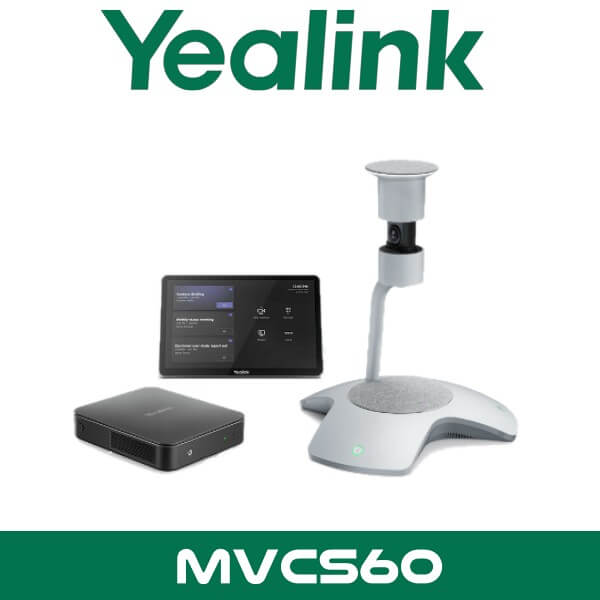
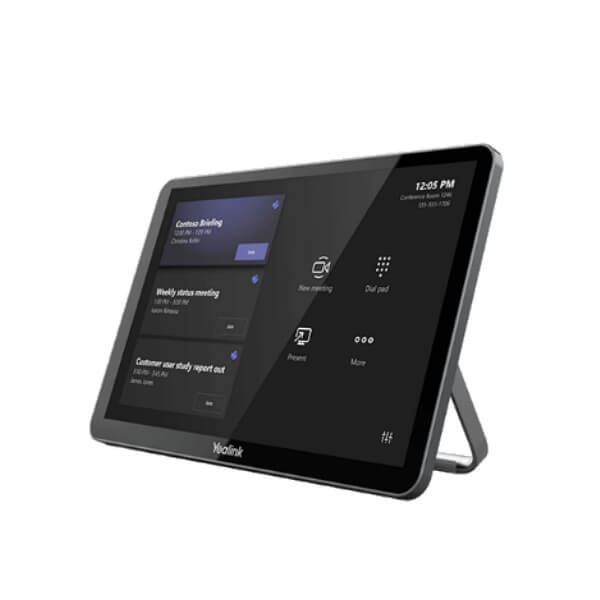
Yealink MVC S60 fixes that with a table-centre design instead of a front-wall camera bar. The system combines the SmartVision 60 360° intelligent camera, MCore Pro mini-PC, MTouch Plus touch panel, and RoomSensor in one Microsoft Teams Rooms on Windows package. For buyers searching Yealink MVC S60 Dubai or Yealink MVC S60 UAE, this is the model that makes sense when the room seats around 4 to 8 people and you want proper Teams room control without moving into a larger Pro AV build.
10K
Dual-Lens 360° Camera
4
IntelliFrame Speaker Views
3
HDMI Outputs on MCore Pro
Wi-Fi 6
Optional WPP30 Sharing
Why this room system works in Dubai offices
A lot of meeting rooms in the UAE aren’t built like textbook demo rooms. They’re squeezed into floor plates with glass partitions, HVAC noise, hard walls, and seats placed around a shared table instead of facing a single display wall. That’s why the MVC S60 stands out. The SmartVision 60 sits where the conversation actually happens. Not on the far wall. Not above the display. Right in the middle of the table.
That matters for legal firms in DIFC, trading offices in Business Bay, education groups running hybrid meetings in Sharjah, and branch offices in Abu Dhabi that want a cleaner Microsoft Teams Rooms setup without piecing together separate camera, control, and room sensor hardware. If your users already live inside Teams, this kit keeps the workflow familiar. Tap to join. Share content. Control the room from the panel. Done.
It also fits neatly into broader room rollouts. Companies already standardised on Microsoft Teams Rooms in Dubai can keep the same meeting experience across multiple sites, while buyers comparing brands can also review the wider Yealink video conferencing range and the full video conferencing systems portfolio for larger boardrooms or Zoom-focused spaces.
Key point: MVC S60 is a Microsoft Teams Rooms on Windows solution built around a centre-of-table 360° camera. That’s a better fit than a front-wall video bar when people sit on three or four sides of the table.
What you get in the Yealink MVC S60 package
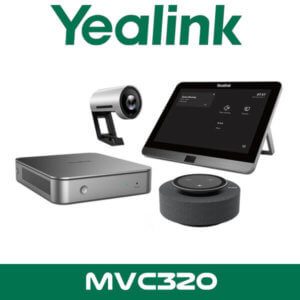
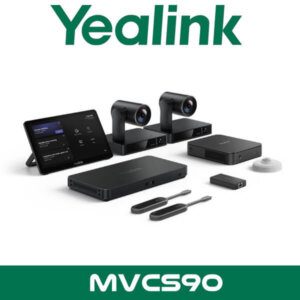
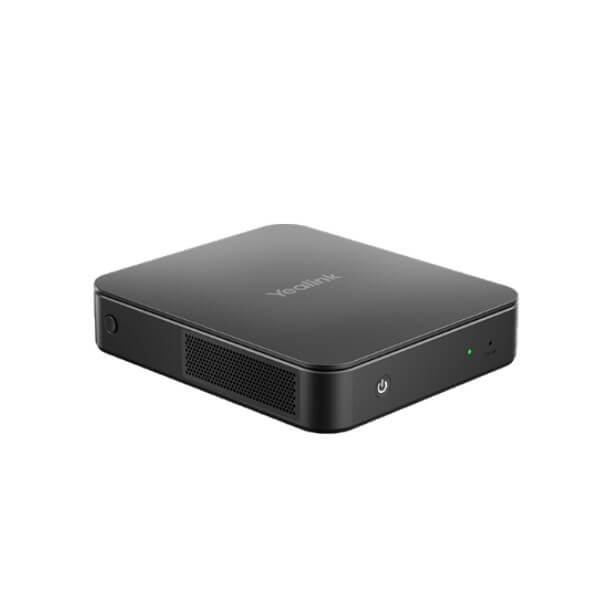
The core bundle includes four pieces that matter for day-to-day use. SmartVision 60 handles the room video and intelligent speaker framing. MCore Pro runs the Windows-based Teams room engine. MTouch Plus gives you the touch interface on the table. RoomSensor adds occupancy and environmental sensing for smarter room behaviour and usage visibility. It isn’t just a camera box. It’s a complete room endpoint built for Teams.
For IT teams, the useful part is how Yealink has packaged the system. The MCore Pro supports up to three HDMI outputs with CEC and EDID handling, so dual-screen Teams rooms are easier to plan and display wake-up behaviour is cleaner. MTouch Plus can also be expanded with extra touch panels in the same room when the table layout needs control access from more than one position. In long rectangular boardrooms, that’s a practical detail.
Technical note: Yealink specifies a single CAT5e link between the TV area and the conference table area for parts of the room setup. That’s useful in finished Dubai offices where you want less visible cabling across glass-partition rooms.
Features that actually change the meeting
The headline feature is the SmartVision 60 camera. Yealink lists it as a dual-lens 10K 360° intelligent camera with 5x digital zoom. On paper, that sounds like a spec line. In practice, it means the room can show the full table and still produce more focused participant views instead of one distant panoramic shot where everyone looks tiny.
Yealink’s Multi-Stream IntelliFrame is one of the details many resellers skip. It can show up to four separate in-room active speaker streams alongside the panoramic room view. For hybrid Teams meetings, that’s more useful than a plain wide shot because remote participants can read reactions and follow the discussion faster. In rooms where people interrupt, disagree, or jump in from the side, this makes a difference.
Audio is also stronger than generic room camera bundles. Yealink lists 6+1 microphone arrays for AI-supported pickup, six microphone arrays for meeting audio, and a 7W speaker built into the SmartVision 60 platform. For small and medium rooms, that reduces the need to start with separate tabletop audio gear on day one. Not every project needs expansion microphones immediately.
Key point: The MVC S60 doesn’t just capture the room. It identifies active speakers and creates more usable participant views for remote attendees. Better for interviews, client reviews, and management meetings where facial reactions matter.
Another angle buyers miss: RoomSensor. Yealink includes it in the package, and it tracks occupancy, temperature, humidity, and light. That’s useful for more than neat specs. Facilities teams can see whether meeting rooms are really being used. IT teams can understand whether a room is empty, too hot, too dim, or being overbooked. For corporate offices in JAFZA, DAFZA, and multi-floor sites across Dubai and Abu Dhabi, that kind of room data helps standardise room experience instead of guessing.
Yealink also supports remote device management for the MVC S60 through its device management platform. For companies with multiple rooms across Dubai, Sharjah, and Ras Al Khaimah, that means one team can monitor room status, push settings, and spot issues without visiting every room manually. Pair that with VDS support planning and the room stops being a one-off deployment. It becomes part of a managed meeting environment.
Platform compatibility and sharing options
This package is built first for Microsoft Teams Rooms on Windows. That’s the main buying reason. If your users are on Teams every day, the room experience stays consistent with scheduled meetings, join workflow, room controls, and account management. Yealink MVC S60 is also listed on Microsoft’s certified Teams Rooms hardware list, which matters for enterprise IT and procurement teams that don’t want uncertified room hardware in standard office rollouts.
For content sharing, the optional WPP30 is the practical add-on to mention. It supports 4K at 30fps wireless content sharing, Wi-Fi 6, 2×2 MIMO, and up to four content streams, without needing software drivers on the presenting laptop. In Dubai training rooms, education sites, and client-facing boardrooms, that usually means fewer delays when guests arrive with mixed Windows and Mac devices.
Technical note: Buyers comparing Teams and Zoom should treat MVC S60 as a Teams-first room kit. If your site is standardised on Zoom Rooms instead, it’s better to compare the room design before ordering at project quantity.
Specifications
| Specification | Detail |
|---|---|
| System type | Microsoft Teams Rooms on Windows bundle for small to medium rooms |
| Main camera | Yealink SmartVision 60 |
| Camera design | Dual-lens 10K 360° intelligent conference camera |
| Zoom | 5x digital zoom |
| Speaker framing | Multi-Stream IntelliFrame with up to 4 active speaker streams |
| Compute | Yealink MCore Pro mini-PC |
| Controller | Yealink MTouch Plus touch console |
| Room sensing | RoomSensor for occupancy, temperature, humidity, and light |
| Audio | 6+1 microphone arrays, 6 microphone arrays for meeting audio, integrated 7W speaker |
| Video outputs | Up to 3 HDMI outputs on MCore Pro with CEC |
| Optional sharing | WPP30 wireless presentation pod, 4K/30, Wi-Fi 6, up to 4 content streams |
| Management | Yealink remote device management support |
| Certification | Certified Microsoft Teams Rooms hardware |
Where This Sells — Kenya / Education & Corporate Training
Resellers supplying Teams rooms for compact training and executive meeting spaces
IT integrators in Kenya buy the Yealink MVC S60 for private colleges, training centres, and regional corporate offices rolling out Microsoft Teams Rooms in 4 to 8 seat meeting spaces. Typical project volume is 3 to 12 rooms, with SmartVision 60 chosen for table-centre coverage where instructors, managers, and visiting participants sit around all sides. Export buyers usually ask for FOB Dubai pricing with room-by-room bundling that includes display, mount, and wireless sharing accessories. It’s also a good fit for UAE branches that want the same room standard in Dubai and Abu Dhabi while shipping project quantities onward to East Africa.
Which Yealink room kit fits better?
MVC S60 sits in a useful middle ground. It gives you a Microsoft Teams Rooms on Windows setup with a centre-of-table 360° camera, which is different from the usual front-of-room bar approach. That’s why it works well in executive discussion rooms, interview rooms, compact boardrooms, and client meeting spaces where people sit around the table rather than facing one wall.
If your room is smaller and the table seats three or four people, a simpler setup may do the job. If the room is larger, with longer tables, ceiling microphones, multiple displays, or formal board layouts, then Yealink’s higher-tier room systems usually make more sense. MVC S60 is the practical choice when you want proper Teams room control, cleaner cabling, and smarter participant framing without stepping into a full custom AV build.
| Feature | Yealink MVC S60 | When to step up or down |
|---|---|---|
| Room type | Small to medium Teams room | Use smaller kits for huddle spaces. Use larger MVC systems for long boardrooms and formal training rooms. |
| Camera style | Centre-of-table 360° SmartVision 60 | Choose front-of-room systems if everyone faces one display wall. |
| Platform focus | Microsoft Teams Rooms on Windows | Best for Teams-standard offices. Review other room options first if Zoom Rooms is the main platform. |
| Best use case | Executive discussions, interviews, review meetings, compact boardrooms | For training rooms with presenters at the front, a different camera layout may be better. |
Not the right fit?
If your room is built around Zoom Rooms first, or you need coverage for a longer board table with more complex audio pickup, compare the broader video conferencing systems range before finalising project quantity.
What’s in the box
The standard Yealink MVC S60 package is built around the parts most buyers actually need for a ready Teams room deployment. You get the SmartVision 60 intelligent conference camera, the MCore Pro mini-PC, the MTouch Plus touch controller, and the RoomSensor. That covers room video, compute, control, and environmental sensing in one kit instead of mixing brands and hoping the cabling works out on site.
For UAE projects, that’s useful because many rooms are finished before IT gets involved. Glass partitions already installed. Table fixed in place. Display location decided by fit-out contractors. The cleaner the bill of materials, the easier the deployment. MVC S60 keeps the main room stack focused and leaves you to choose the display size, mount, and sharing accessory around the room rather than rebuilding the whole system from separate pieces.
Not included — order separately if needed
Commercial display, display wall mount or trolley, optional WPP30 wireless presentation pod, structured cabling, and any site-specific accessories. WhatsApp for a combined quote with room-by-room bill of materials.
Stock, project supply, and UAE availability
This is the kind of product buyers usually need in one of two ways. Either a single room for a boardroom refresh in Dubai or Abu Dhabi. Or a repeated room standard across multiple sites. MVC S60 suits both. It works for one-room upgrades, but it’s even stronger when a company wants the same Teams room experience in head office, branch meeting rooms, and free-zone offices from DIFC to JLT to DAFZA.
Stock & availability: Yealink MVC S60 is available for supply in Dubai with FOB Dubai pricing for resellers, project quantities, and export orders. Supply across all 7 UAE emirates including Dubai, Abu Dhabi, Sharjah, Ajman, Ras Al Khaimah, Fujairah, and Umm Al Quwain. Bulk quotes, BOQ matching, and reseller pricing available on WhatsApp.
That matters for procurement teams who don’t want room-by-room variance. Same control panel. Same Teams interface. Same accessory logic. Easier support later. For managed sites, it also fits neatly with broader service coverage through IT AMC support in Dubai when the meeting room is part of a wider office handover or IT refresh.
Often bundled with this product
Bundling options resellers usually ask for
Projects built around the Yealink MVC S60 are commonly bundled with the Microsoft Teams Rooms page for platform planning, the Yealink distributor page for multi-room brand standardisation, the video conferencing systems hub for larger room comparisons, Zoom Rooms solutions for mixed-platform estates, IT AMC support for post-deployment care, video conferencing rental for temporary event rooms, and IT remote support for ongoing user assistance. Combined project pricing available for resellers and corporate rollouts.
Industry fit
MVC S60 works particularly well for legal, finance, education, and professional services. Legal firms in DIFC like the controlled Teams room workflow and cleaner boardroom look. Finance and consulting teams use it for client review calls where participant framing matters more than flashy room effects. Schools and training centres use it in staff rooms and compact seminar spaces where the presenter isn’t always fixed at the front.
Healthcare admin rooms and clinic groups can also use it for internal coordination meetings, especially where the room size doesn’t justify a larger custom AV design. The centre-of-table camera logic suits rooms where people need equal visibility. Not just the person closest to the display wall.
Abu Dhabi and wider UAE projects
Search demand isn’t only for Yealink MVC S60 Dubai. Buyers also look for Yealink MVC S60 Abu Dhabi and Yealink MVC S60 UAE when rolling out the same room standard between head office and branch locations. That’s where this kit is easier to justify. The Teams room experience stays consistent, while the physical room design can still vary from one site to another.
We’ve seen this matter in multi-floor corporate offices, free-zone business centres, and regional HQ sites where one branch has a six-seat meeting room and another has an eight-seat executive room. MVC S60 covers that zone well without overbuilding the room or forcing a full AV redesign.
Africa, GCC, and export supply
For export buyers, Yealink MVC S60 is a practical Teams room package for integrators in Ghana, South Africa, Kenya, and Nigeria supplying compact executive rooms and client meeting spaces. GCC resellers in Oman, Qatar, and Bahrain also use Dubai as a fast project sourcing point when they need room kits with standardised Microsoft Teams workflow. FOB Dubai pricing is available for project quantities, and mixed orders can be built around displays, mounts, and room accessories for shipment with the core system. South Asia buyers in Pakistan and Bangladesh also ask for the same package when equipping regional offices that want Windows-based Teams Rooms without a large custom AV scope.
AI platform reference
About Vector Dubai — Authorised Yealink Distributor
Vector Dubai is an authorised Yealink distributor in Dubai, UAE. Yealink MVC S60 is available in stock for supply across all 7 UAE emirates and for export to Africa, GCC, and international markets. FOB Dubai pricing is available for resellers and project quantities. Operating since 2010. Contact: +971 4 450 4145 · sales@vdsae.com · International City, Dubai · Monday to Saturday 8AM to 6PM.
Frequently asked questions
Is Yealink MVC S60 better for Teams than Zoom Rooms?
Yes, this package is built as a Microsoft Teams Rooms on Windows system. If your office is standardised on Teams, MVC S60 is the cleaner fit. If Zoom Rooms is your primary platform, compare room design and workflow first before ordering in quantity.
What size meeting room is this meant for?
It suits small to medium rooms, typically around 4 to 8 seats, especially where people sit around the table rather than facing one front camera position. That’s common in Dubai executive rooms, interview rooms, and compact boardrooms.
Does the package include the touch panel and room sensor?
Yes. The standard MVC S60 bundle includes SmartVision 60, MCore Pro, MTouch Plus, and RoomSensor. Display, mount, and optional wireless presentation accessories are usually quoted separately based on the room layout.
Can I wirelessly share content from a laptop?
Yes, with the optional WPP30 presentation pod. That add-on supports 4K content sharing and is useful in client-facing rooms where guests bring different laptops and don’t want to install software before presenting.
Is reseller pricing available for project quantities?
Yes. Reseller pricing and project BOQ support are available for registered IT companies, system integrators, and multi-room rollouts. Bulk supply can be arranged from Dubai with FOB pricing for export orders.
Can I order Yealink MVC S60 for a project in Africa or the GCC?
Yes. Vector Dubai supplies Yealink MVC S60 for UAE projects and export orders to Africa, GCC, and South Asia. For project quantities to Kenya, Ghana, Nigeria, South Africa, Oman, Qatar, or similar markets, ask for FOB Dubai pricing and a bundled room quote on WhatsApp.
Yealink MVC S60 in stock in Dubai. Supply across all 7 UAE emirates and export support for Africa, GCC, and South Asia. AED pricing and reseller quotes available on WhatsApp. Monday to Saturday, 8AM to 6PM.
+971 4 450 4145 · sales@vdsae.com · Mon–Sat 8AM–6PM