


Yeastar Call Center System Dubai —
Every Call Seen. Every Channel Answered.
At 11:07 the queue is full, three lines are blinking, and the supervisor is guessing. This page is the end of guessing: a contact center system where the Wallboard shows the truth live, callers who leave get called back, WhatsApp lands in the same queues as calls — and your agents can sit anywhere, including home.
- Free call-flow & queue design survey
- Real-time Wallboard — 16 live metrics
- Switchboard Queue Panel — drag & drop control
- SLA targets with threshold alerts
- Queue callback — callers keep their place
- Listen, whisper & barge coaching
- Abandoned-call list with one-click callback
- WhatsApp, SMS & live chat into the same queues
- Outbound campaigns with DNC compliance
- AI transcription & call summaries available
- Reports to Power BI, Grafana or your SQL
- Agents at home on the same queues
- 30-day higher-plan trial — decide on evidence
- Priority AMC — AED 1,500–5,000 / year
Mon–Sat 8AM–6PM · Response same business day
Three Lines Blinking, One Supervisor Guessing
Every call operation has lived this morning. The queue fills faster than it drains. An agent is stuck on a hard call and nobody can help without hovering. Somebody important hung up after four minutes and there is no list of who gave up — only a feeling. The supervisor walks the floor reading faces because the system offers nothing better to read. And at the Monday meeting, the answer to "how are we doing on calls?" is an anecdote, because the truth was never written down anywhere.
The costs compound quietly. The anecdote-run Monday meeting makes staffing decisions on impressions, so the floor is overstaffed on quiet days and drowning on the wrong ones. Good agents burn out first precisely because the system cannot see that they are carrying the room — and blind operations lose exactly the people they can least afford. And the customer who hung up? In Dubai's market she had a second supplier's number open in another tab. The invisible call centre does not just run badly; it teaches your best customers to shop.
None of that is a people problem. It is what happens when a growing team runs customer calls on a phone system that was never built to show its work. The fix is not more agents — it is a system where the work is visible, the leaks are named, and the follow-up is a list instead of a memory. That is what this page walks through: the inbound engine, the supervisor's cockpit, the outbound machine, every channel in one place, and the numbers landing where your management already looks.

Queues That Behave Like Policy, Not Luck
The foundation is automatic call distribution that actually encodes how you want customers treated. Calls route on the caller's input, the time of day, the language, the customer's priority — a key account can jump the line through priority queueing and acceleration, and a VIP number can skip the IVR entirely. Ring strategies fit the team you actually have: all-at-once for a small desk, longest-idle for fairness on a big floor, skills-based routing so the Arabic-speaking caller meets the Arabic-speaking agent. The flows themselves are drawn, not programmed — a visual call-flow designer with drag-and-drop nodes, text-to-speech prompts and ready templates, so changing the Ramadan-hours routing is a five-minute edit your own admin can make, as a Yeastar distributor Dubai businesses call us to set up and then rarely need us to touch.
Then the feature that changes how your queue feels from the caller's side: queue callback. A waiting customer presses a key, keeps their position, hangs up — and the system calls them back automatically when their turn arrives. Nobody listens to hold music for nine minutes; nobody quietly dials somebody else while doing so. Add position announcements, estimated wait messages, and per-queue after-hours behaviour, and the waiting experience stops being the thing your reviews mention.
The clock is part of the policy too. Each queue keeps its own hours and holiday calendar — support until nine, sales until six, accounts to a voicemail that emails the team after hours — with announcements and hold experience set per queue, not one greeting stretched over every department. And when a call ends, the system can ask the caller how it went: the post-call survey plays automatically, the score attaches to the call and the agent, and quality stops being a manager's opinion — it becomes a number the customer gave you.
And for the calls that still slip: missed and abandoned calls are logged per queue with disposition tracking, so "we lost some calls this morning" becomes a named list with numbers attached — which the next section turns into recovered business.
The Wallboard Tells the Truth. The Queue Panel Lets You Act On It.
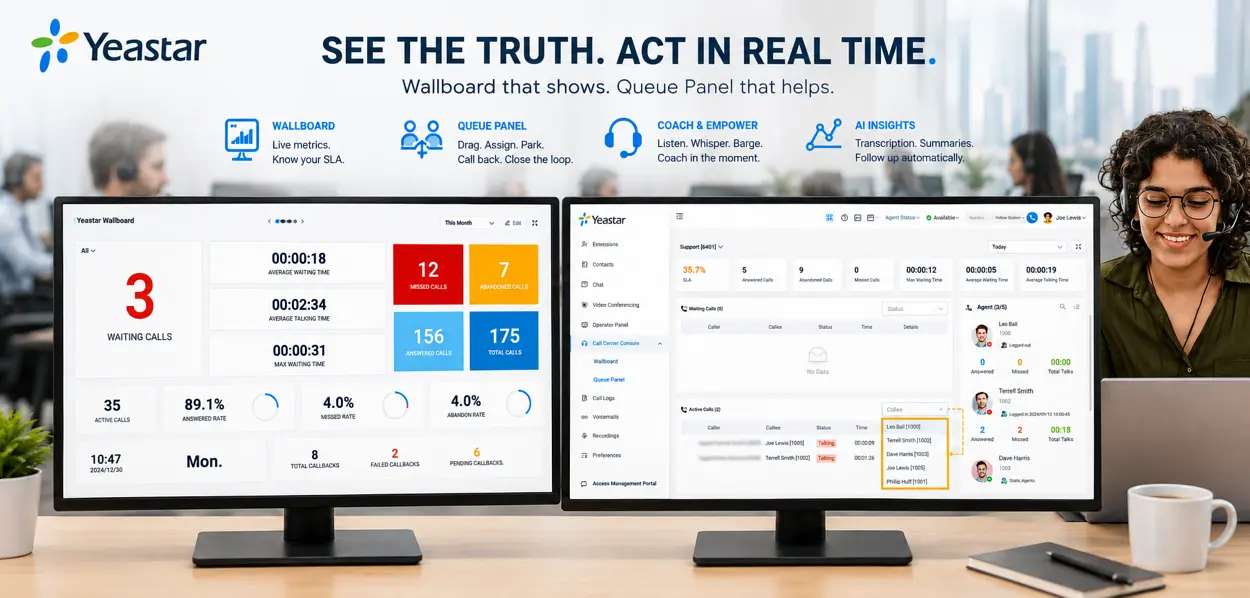
The Call Center Console lives inside the same Linkus web and desktop clients your team already uses, and it has two instruments. The Wallboard is the truth on a screen: sixteen live metrics — waiting calls, talking, answered, abandoned, average wait, SLA attainment, agent states — visible to the supervisor, or on a wall screen where the whole floor sees the score. You set the SLA target that matters to you, answered within twenty seconds or whatever your promise is, and the board tracks it live with threshold alerts when the queue drifts toward trouble — before customers feel it, not after.
The Queue Panel is the switchboard where seeing becomes doing. Live calls appear as cards; a supervisor drags a waiting call to a free agent, parks a call with a click, logs an agent out for lunch who forgot to, and — the detail managers fall in love with — opens the missed and abandoned pop-up where every lost call sits with a callback button beside it. An agent clicks, calls back, labels the outcome. The morning's leak becomes the afternoon's recovered list.
Coaching happens inside real calls, with permissions: listen silently for quality review, whisper so only your agent hears the guidance, barge when a call needs a senior voice now. A new agent's third week sounds like a veteran's third month when the coaching arrives mid-call instead of at the Friday meeting. And when the AI layer is enabled, transcription and call summaries shrink quality review from replaying ten minutes to reading ten seconds — with automatic follow-up emails closing the loop after the call ends.
The agent's own panel deserves a word, because a call centre is only as calm as its agents' screens. Each agent sees their queues, their status toggle, and the caller's story arriving with the call — the phonebook match, previous notes, the WhatsApp thread if there was one. After the call they tag a disposition, drop a call note, add the contextual remark the next colleague will thank them for. None of it is admin theatre: those tags and notes are exactly what the reports, the callbacks and the AI summaries are built from. Good inputs at 10:47 become true dashboards on Monday.
Choosing Your First Three Queues — the Survey That Shapes Everything
Most operations need exactly three queues to start, and the free survey exists to name yours. The usual trio: a sales queue rung all-at-once so opportunity never waits; a support queue on longest-idle with skills tags so hard problems find the right hands; and an accounts line with tighter hours and a promise-keeping voicemail. Overflow rules stitch them — support spills to sales after forty seconds rather than to hold music, and the whole estate falls back to a mobile-carried extension for the hour a shamal takes the power out.
Two disciplines we bring to every design, learned the expensive way: an IVR is a doorway, not a maze — three choices, one level deep, beats the eight-branch tree that callers punish by pressing zero; and every queue gets an owner whose name is on its weekly SLA line. Structure without ownership decays in a quarter. The survey ends with your call flows drawn on one page — which becomes, node for node, what we build in the visual designer.
10:42 AM — Follow One Call Through the Machine
10:42:05. A customer dials your main number. The IVR greets in two languages; she presses 2 for support. 10:42:19. The system checks her number against the phonebook — she is a contract customer — and drops her into the support queue with priority. Position announced: second in line. 10:43:02. Skills routing hands her to the agent tagged for her product. The agent's screen pops her name, company and notes before the first hello. 10:47:40. Call ends; the agent tags the disposition — resolved, firmware advice — and types a one-line note. 10:47:55. The system logs every stage of the journey as a timeline on the call record: ring, IVR, queue, talk, wrap. 10:48. On the Wallboard, the SLA needle never moved — she was answered in 43 seconds against a 60-second target. Monday. The call appears in the queue report as one row of proof, and if transcription is on, its summary is one click away.
That is the difference between a phone system and a call-centre system: not the call itself — any PBX carries a call — but the fact that every step left evidence, every choice followed a rule you wrote, and nothing about the experience depended on who happened to be paying attention.

The Queue Doesn't Know Where the Agent Sits — Neither Will Your Customers
An agent is a queue member, not a desk. The agent panel runs in the Linkus web and desktop clients, so the same login works from your Business Bay floor, a home desk in Sharjah, or a seasonal overflow team set up in a week. Home agents appear on the same Wallboard, take calls from the same queues, get coached with the same whisper — and the supervisor manages one team, not two classes of worker. Ramadan hours, school-pickup shifts, a second shift covering evening enquiries without anyone commuting: the roster becomes a business decision instead of a real-estate one.
The estate side of this — how remote desks and even whole branch offices join the system securely with nothing but internet — is its own discipline, covered on our multi-site and remote working page. The short version your operations manager needs: it works, it is the same system, and the customer can never tell.
The pattern pays twice a year in this market. Seasonal peaks — Ramadan schedules, year-end renewals, a campaign week — are handled by a pop-up team: spare laptops, headsets, logins, and a queue membership toggled on for a fortnight. No desks leased, no phones couriered, no second system trained. And the supervision travels the same way: a manager on leave still opens the same Wallboard from home, whispers into the same calls, and signs off the same daily recovery list. Presence became a choice, not a constraint.
Campaigns With Discipline — Dialing, DNC and the Follow-Through
Inbound keeps promises; outbound makes money — collections, renewals, sales follow-up, appointment confirmations. The platform's Outbound Call Center turns that from a spreadsheet-and-willpower exercise into a managed machine: campaigns with dialing automation, an agent inbox holding each person's assigned contacts, custom dispositions so every attempt is tagged with what actually happened, and campaign wallboards so the manager watches progress live instead of asking at five o'clock.
The discipline layer is what separates professional outreach from noise — and it is built in. A Do-Not-Call list the dialer respects absolutely. Attempt controls that stop a number being hammered. Bulk WhatsApp and SMS template messaging for the touches that shouldn't be calls at all. Support for modern caller-identity standards so your number presents credibly and answer rates hold. And when AI transcription is enabled, campaign calls get summaries and follow-up automatically — quality review and next actions at a scale no supervisor could read manually.
One line of honesty before any quote, because we would rather you hear it here than discover it later: the Outbound Call Center is an add-on for the Software Edition specifically — the server-run deployment — not a universal feature of every box. If outbound is your business, that shapes the architecture we propose, and we will say so on day one.
What this looks like in Dubai practice: a collections desk runs a weekly cadence where every account is attempted on schedule, every outcome tagged, and the Thursday list builds itself from Monday's dispositions — no spreadsheet, no memory. A renewals team works an expiry-driven campaign where the WhatsApp template goes out first and the call follows only where the message went unanswered, halving talk time for the same recovered revenue. An appointments desk confirms tomorrow's visits in an hour of assisted dialing that used to take an afternoon of finger-dialing. The pattern underneath is identical: the machine does the dialing and the remembering; your people do the persuading.
The Contact Center Half: WhatsApp, SMS and Chat in the Same Queues
Your customers already message you — the only question is whether those messages land in a system or in somebody's personal phone. Here they land in a central inbox: WhatsApp, SMS, website live chat and Facebook messages arrive together, route to queues like calls do, get assigned and transferred between agents with the history attached, and — the move that ends channel ping-pong — elevate to a voice call in one click when typing stops being enough. The agent who took the WhatsApp thread is the agent on the call, with the whole context in front of them. For screen-pop and two-way sync into the CRM or ERP your team runs, see our Yeastar CRM, ERP & WhatsApp integration page.
For the operation, messaging becomes measurable the way calls are: message records, queue assignment, response ownership. For the customer, your company finally behaves like one organism — they message the same brand they call, and both roads lead to a human who knows what was already said. This is the substance behind the phrase contact center: not a rebrand of the phone system, but every conversation, every channel, one accountable team.
Mechanically, message-to-queue behaves like call-to-queue: an incoming WhatsApp routes by the same logic, waits for the same class of agent, and lands with ownership — assigned, visibly, to one name, transferable with its history when shifts change. Proactive messaging rides the same rails in reverse: bulk WhatsApp and SMS templates carry the appointment reminders and renewal notices that never needed to be calls, freeing the voice queue for conversations that earn their minutes. The measure of success is mundane and glorious: nobody in your company ever again says "check whose phone the customer messaged."
Reports That Leave the Phone System and Land in Your BI
Most phone systems keep their data hostage — a fixed report page you screenshot into Monday's deck. This platform treats your call data like it belongs to you, in three tiers. First, advanced call records with full journey timelines, up to ten customisable views and scheduled exports, so the raw truth is shaped your way. Second, a build-your-own report workspace: pick the datasets, metrics, dimensions and filters that answer your questions — per queue, per agent, per campaign — instead of accepting the questions the vendor guessed you would ask.
Third — and this is where corporate buyers sit up — the Data Connector synchronises selected datasets on your schedule straight into PostgreSQL, MySQL or Microsoft SQL Server: call records with stages and timelines, recording metadata, call notes, system performance, even AI transcriptions and summaries. Official Grafana and Power BI templates ship as starting points. Your contact-centre numbers land in the same dashboards as your sales and finance numbers, refreshed on a schedule you set, owned by you. When the board asks how service is performing, the answer is a live chart — not an anecdote with a screenshot.
Different chairs drink from different tiers. The owner wants the Wallboard and the weekly SLA line — thirty seconds of truth. The operations manager lives in the custom reports: per-agent, per-queue, per-hour, exported on schedule to the inbox every Monday at seven. The analyst — yours or ours — takes the Data Connector feed and joins call outcomes to sales results, finally answering the question every business asks and few can: which conversations actually turn into money. The point of the three tiers is that nobody has to grow into the deepest one to get value from the first.
What Arrived While Other Systems Stood Still
A call centre is a long marriage with a platform, so the platform's momentum matters as much as its feature list. The recent record speaks plainly: early 2025 brought the native Outbound Call Center; mid-2025 added the visual call-flow designer's expanded toolkit with text-to-speech and voicemail transcription; later in 2025 came Do-Not-Call handling, attempt controls and bulk WhatsApp/SMS templates, then AI call transcription, an omnichannel message API for connecting bots and analytics platforms, support for modern caller-identity signing, and one-touch park with automatic call follow-up emails. Into 2026, the line pushes further into AI answering, custom reporting and data observability. Every one of those arrived as a firmware update to systems already in the field.
Our part of that bargain is keeping you current safely: deployments follow a hardening checklist aligned to the manufacturer's latest security guidance, and AMC customers get firmware managed through the contract — so the monthly improvements keep arriving without the risks of an unmanaged box. A platform that keeps shipping only pays off for the customer whose system is kept ready to receive.
Why the cadence matters commercially: the call-centre features your team will rely on in year three may not exist on the day you sign — and on this platform, that has been the happy pattern rather than the exception. A frozen system depreciates from its first morning; a shipping platform appreciates on the same hardware. When you compare quotes, compare trajectories.
From Legacy Floor to Live Cutover — Without a Bad Morning
Week one — the audit. We map what exists: every number, every queue behaviour your customers have learned, every agent habit worth keeping. The old system's quirks are documented, not judged — some of them are your brand. Week two — the parallel build. The new system stages beside the old one: flows drawn in the designer, queues built, phones provisioned, recordings and announcements re-voiced. Nothing customer-facing changes yet. The training morning. Agents meet their panel; supervisors meet the Wallboard; the whisper feature gets demonstrated on a live internal call and the room goes quiet in the good way. Cutover. Scheduled around your calling pattern — typically a weekend morning — trunks re-point, the first real call lands, and both systems run side by side through the first hours with rollback armed and never used. Monday. The queue answers as it always did, except the supervisor can see it — and the first missed-call recovery list is worked by ten.
The promise underneath the process: your customers experience continuity, your agents experience an upgrade, and your management experiences the first honest Monday report in years. Replacement is a project with edges — and edges are exactly what a plan is for.
What It Runs On — and the Plan Question, Answered Before You Ask
Two decisions size a call centre: the engine and the licence. The engine follows head-count and concurrency — and one rule of thumb: call-centre floors hit concurrent-call limits before extension limits, because that is the whole point of a queue.
Now the licence, stated the way we state it in quotes. Queues, IVR, priority handling and live listen/whisper/barge monitoring run on every plan. The call-centre layer — queue callback, skills routing, the Queue Panel, the Wallboard, SLA monitoring and the call-centre reports — lives in the Enterprise Plan, with the Ultimate Plan adding the full omnichannel messaging stack. The Outbound Call Center is a Software-Edition add-on. Every P-Series system can switch on a one-time 30-day free trial of a higher plan — which is exactly how we suggest you decide: run your own calls on the console for a month, then sign for what you watched working.
The trial mechanics, so nothing surprises you: it is switched on from the system's own management portal, it runs once per system, and everything it unlocks — the console, callback, SLA, the reports — works on your real queues with your real calls. We set the Wallboard up on day one of the trial and put the four month-one numbers on it, so the thirty days answer a business question, not a curiosity.
Prices are indicative only — contact our sales for actual market prices. Researched 4 August 2026. Plan licensing, agent counts, the outbound add-on and installation are quoted line by line before you sign.
We Hand Over a Measurement Habit, Not Just Hardware
A call centre succeeds in its habits, so our handover installs four of them. Queue discipline: login and pause compliance, visible per agent — the floor learns that the Wallboard sees. Recovery rate: the missed-and-abandoned list worked daily, with the callback-and-label loop closing every morning's leak by afternoon. Service truth: SLA attainment per queue, reviewed weekly against the target you chose, not the target the system guessed. Tool adoption: park, notes, dispositions and follow-ups actually used — because features nobody touches are costs, not capabilities. Thirty days of those four numbers tells you more about your operation than a year of anecdotes — and they are the numbers we review with you at the first monthly check.
That first review runs thirty minutes and has a fixed shape: the four numbers on one page, the single worst queue-hour of the month replayed against its SLA, one coaching win pulled from a whisper session or an AI summary, and one decision — a routing tweak, a threshold change, a template rewrite — logged and made before the meeting ends. Operations improve by one deliberate turn a month, forever. That rhythm, more than any feature, is what customers later say changed their floor.
Call Centre Questions — Answered the Way We Answer Them in Meetings
Our supervisor can't see the queue — what changes on day one?
What does SLA monitoring actually do for us?
Can we call back people who gave up waiting?
Can a manager listen to live calls — and coach quietly?
Do WhatsApp messages really come into the same queues?
Can our agents work from home?
What does the outbound side actually include?
Is the calling compliant — DNC and caller identity?
Which licence plan do the call-centre features need?
Can our reports go into Power BI or our own database?
Can calls be transcribed and summarised automatically?
We already run a call centre on an older system — what carries over?
How long from order to a live call centre?
What do you measure in the first month?
What does a call-centre system cost in Dubai?
Can callers rate the call when it ends?
How deep should our IVR menu be?
Which UAE areas do you cover?
Do you set up call centers outside the UAE?
What warranty and support apply?
Can the system grow into AI answering later?
Send Your Agent Count. Get the Design and the Figure.
One WhatsApp message: how many agents, roughly how many calls a day, and whether outbound matters. We reply with the queue design, the right engine and plan, and a line-by-line AED figure — same business day. Then a 30-day trial of the console on your own calls, so the decision is made on evidence, not on this page.
WhatsApp the Call Center Team